



Author: Kedar Ganta, Chief Product, Technology, and AI Officer, Caregility
From Paper to Digital to Natural: Voice AI at the Bedside
Healthcare has gone through several major shifts in how care is delivered and documented.
Care once ran on paper.
Then it went digital with screens, clicks, portals, and connected systems to bring people, devices, systems, and workflows together.
That was progress, an important step forward. However, it also created an added burden: our clinicians had to adapt their workflows to technology, often adding more screens, clicks, and steps to their day.
The next shift is different.
We are moving from digital to natural.
Our most natural interface is our voice.
That is where Voice AI begins to change how clinicians interact with technology.
Voice AI is becoming an important addition to the Caregility platform. It is not simply another way to control an application. It makes technology more natural and responsive to how people communicate and interact.
Voice AI: From Documentation to Interaction
We started with documentation, helping clinicians capture information without having to type.
Virtual clinicians can use iConsult, while bedside nurses can use the Caregility APS endpoint in the hospital room. Both can use voice to capture clinical documentation, spending less time at the keyboard and more time with patients.
Documentation is just the beginning.
In our recent releases, we expanded voice beyond documentation and into interaction.
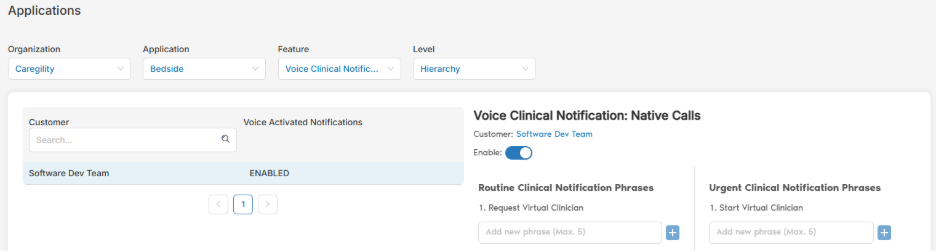
This quarter, we introduced hands-free, voice-activated vLerts on APS. Bedside clinicians can now trigger a request for help or an urgent vLert using spoken commands, without pressing a physical button.
We also introduced Voice-Activated Interpreter calling. Language support can be a time-sensitive need in the patient room. Bedside clinicians can bring an interpreter into the interaction simply by speaking, without finding another device or navigating through multiple screens.
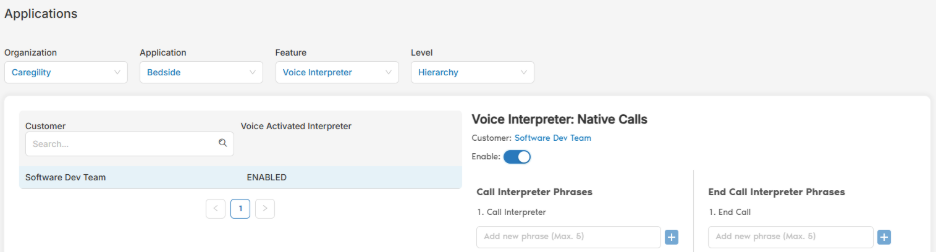
In the next release, we will extend this capability into additional workflows, including voice-activated security alerts for duress notification. Through Control Hub, administrators can configure up to five phrases for the key bedside voice actions. Organizations can customize these phrases to their operational needs.
As AI agents become more capable and reliable, we will extend these interactions further, helping users interact and complete tasks through more natural conversations rather than screens and buttons.
And voice is only one part of that journey.
Technology should adapt to how people naturally communicate, rather than forcing people to adapt to technology. This flexibility is an important part of our platform approach.
Understanding the Room
We are expanding our understanding beyond the individual to the environment around them.
The room itself can provide context through signals such as noise levels and aggressive sounds, helping the care team understand what is happening and respond appropriately.
This is where multimodal AI capabilities begin to work together across the Caregility platform. Voice understands what people say. Computer vision and sensors understand what is happening around them. Workflow context connects that information to what happens next.
In our recent CARES 26.9 release, we continued to enhance Computer Vision, including improved handling of occlusion and better visibility through dashboard metrics. We also introduced in-application tracking for Computer Vision alerts.
Teams can track, review, and record alerts directly within the application, creating a faster feedback loop that helps improve the system.
That may sound like a small product enhancement, but it is an important part of building trustworthy AI. AI that can be measured, understood and continuously improved.
A Simpler iConsult Experience
As AI changes how users interact with the platform, we are also continuing to make the iConsult experience simpler and easier to use.
The new iConsult UI has a cleaner design, a more intuitive experience, and fewer clicks. We are introducing it gradually so customers have time to transition to the new experience.
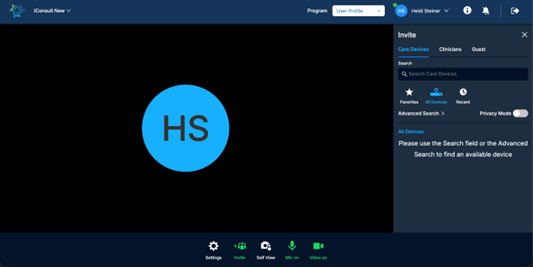
The Classic UI will remain the default until CARES 26.11. The new interface will become the standard beginning with CARES 26.11, and the Classic UI will retire in CARES 27.1.
Other enhancements in CARES 26.11 include,
- Easier Camera Controls: Click-and-drag makes it easier to control the camera. On dual-camera devices, refresh commands now apply only to the active camera.
- Rooms configured as Private-Disabled now display correctly instead of appearing as Offline.
Mobile App Enhancements include:
- Peek-In support is now available for IPC setups in the mobile app.
- Monitoring in Progress indicator lets patients know when monitoring is active, helping with transparency and privacy.
- In-call chat is now available for APD calls on both desktop and mobile.
- Interpreter calling: Clinicians can invite an interpreter directly into a mobile call without requiring a Caregility device.
- Patients can request a Propio interpreter directly from the APD mobile application.
- Touch and Zoom: Users can use touch gestures to zoom into a video/image displayed on screen to support quick review of a specific area or point of interest.
- Faster Alert Response: When clinicians respond to bedside alerts from the Notifications portal, they can connect directly to IPC devices without waiting-room prompts or time-outs.
Together, these updates make iConsult simpler, reduce the number of clicks, and create a more natural experience for clinicians and patients.
Making iObserver More Flexible
The recent enhancements make observation workflows easier to manage and more consistent.
- Privacy Mode status now carries over when an observation is handed off to another observer, ensuring that the privacy state follows the workflows rather than being lost in the transition.
- Intervention reasons: Users can now record and track why an intervention was completed.
- With the Auto-recording option, organizations can configure recording to begin automatically when an observation session begins.
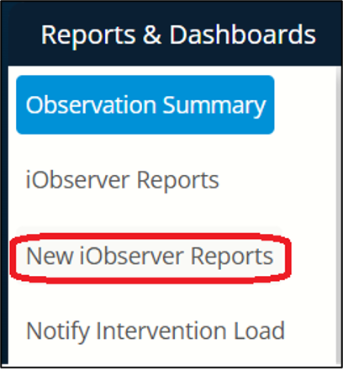
In CARES 26.9, the Advanced iObserver Report became directly accessible from the iObserver application. Users can launch it from the “New iObserver Reports” option.
We are also making these workflows more configurable.
Planned for CARES 27.1 in January 2027, customizable lists will allow care teams to manage options for Observation Reasons, Phrases, Patient Status and Intervention Reasons. Teams will be able to add, remove, and reorder options to match their clinical workflows. These lists will be managed centrally through Control Hub.
Control Hub: Managing the experience
Control Hub continues to evolve as the central place to manage devices, configurations, workflows, reporting, and integrations across the connected care environment.
In CARES 26.9, the Advanced iObserver Report became easier to access directly from iObserver. In CARES 26.11, we are taking the next step by replacing legacy reports with Advanced Reports.
- Flexible time-period selections for easier analysis across different date ranges
- Enhanced “Graph By” options for greater flexibility in visualizing and analyzing data
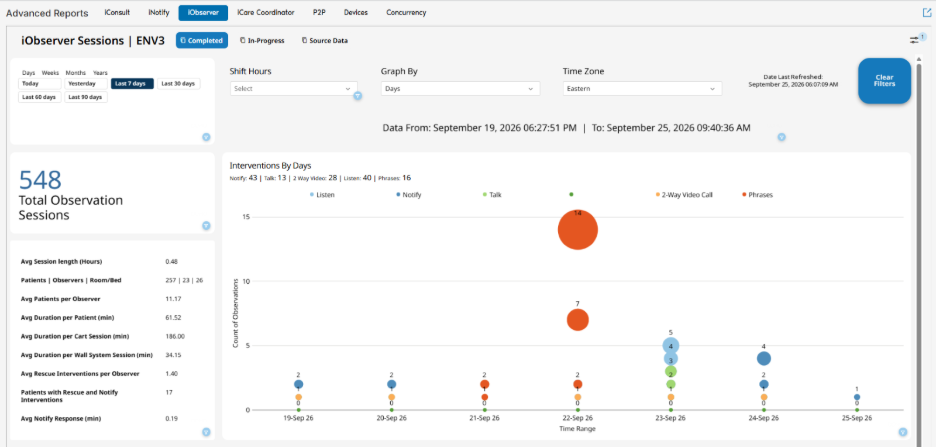
The goal is to make the data easier to access and more useful for understanding how care is being delivered.
Control Hub is also expanding how administrators manage devices. Individual firmware upgrades will be available for Android devices running version 2.1.056 or later, alongside the current Linux firmware management capabilities, including support for Linux 3.x while maintaining compatibility with existing 2.x workflows.
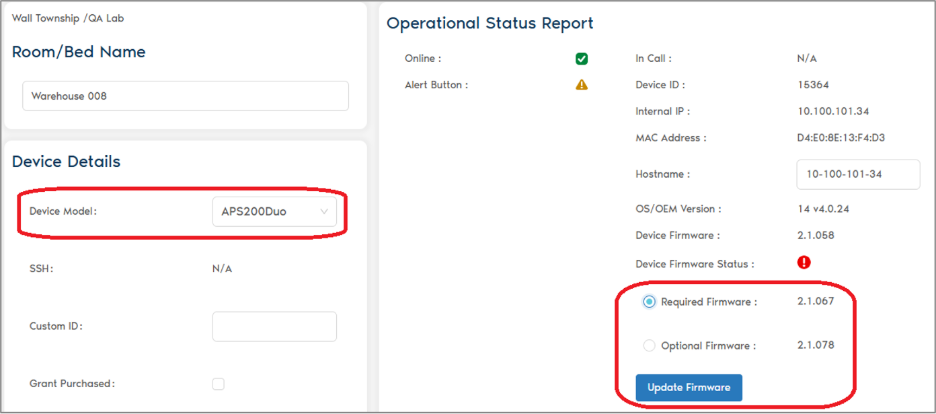
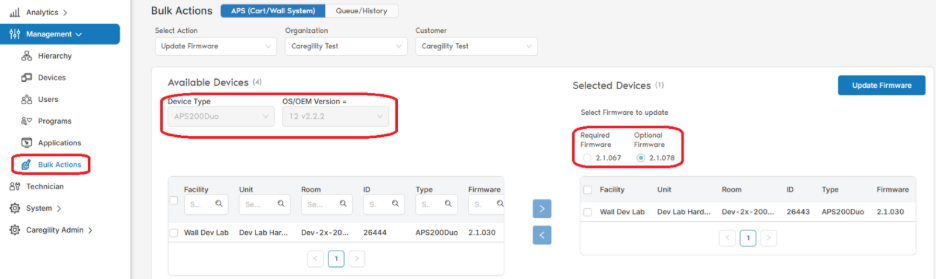
For larger device fleets, Bulk Actions will be centralized under Management > Bulk Actions. New options will allow administrators to update Epic Bedside and Enterprise Wi-Fi certificates across multiple eligible devices at once, reducing the need for repetitive device-by-device updates.
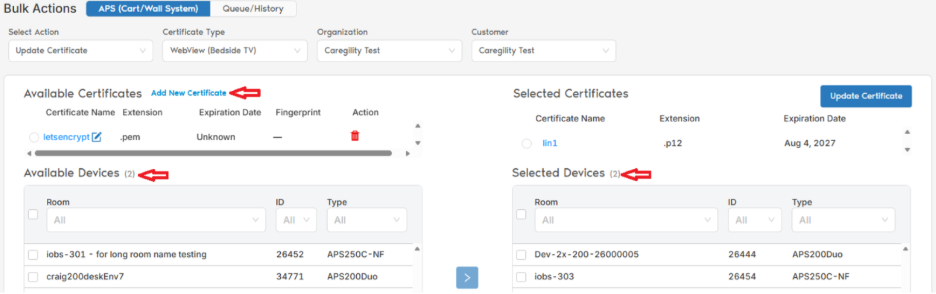
Together, these enhancements make Control Hub a more central and efficient place to manage the connected care environment, bringing insights, configuration, and device management into one experience.
From Digital to Natural
We have spent decades moving information from paper to digital systems. The next opportunity is bigger than simply digitizing workflows.
Paper asked clinicians to write.
Digital asked clinicians to click and type.
The next wave of technology will work naturally alongside clinicians giving them back their time and attention to focus on care.
That requires technology that understands context, responds naturally, and gets out of the way when it can.
A connected care environment brings together sensors, voice, computer vision, devices, and clinical workflows so they can work together naturally around the patient and care team.
That is the promise of moving from digital to natural.
Contact us to learn how the latest Caregility updates support your connected care strategy!
