Author: Kedar Ganta, Chief Product, Technology, and AI Officer, Caregility
From Paper to Digital to Natural: Voice AI at the Bedside
Healthcare has gone through several major shifts in how care is delivered and documented.
Care once ran on paper.
Then it went digital with screens, clicks, portals, and connected systems to bring people, devices, systems, and workflows together.
That was progress, an important step forward. However, it also created an added burden: our clinicians had to adapt their workflows to technology, often adding more screens, clicks, and steps to their day.
The next shift is different.
We are moving from digital to natural.
Our most natural interface is our voice.
That is where Voice AI begins to change how clinicians interact with technology.
Voice AI is becoming an important addition to the Caregility platform. It is not simply another way to control an application. It makes technology more natural and responsive to how people communicate and interact.
Voice AI: From Documentation to Interaction
We started with documentation, helping clinicians capture information without having to type.
Virtual clinicians can use iConsult, while bedside nurses can use the Caregility APS endpoint in the hospital room. Both can use voice to capture clinical documentation, spending less time at the keyboard and more time with patients.
Documentation is just the beginning.
In our recent releases, we expanded voice beyond documentation and into interaction.
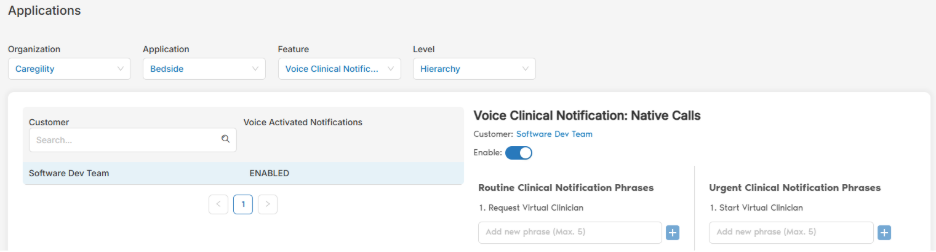
This quarter, we introduced hands-free, voice-activated vLerts on APS. Bedside clinicians can now trigger a request for help or an urgent vLert using spoken commands, without pressing a physical button.
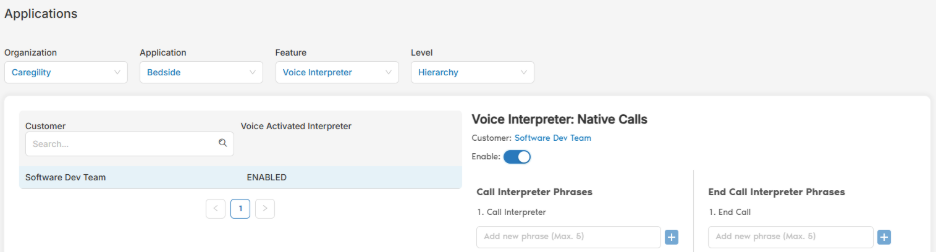
We also introduced Voice-Activated Interpreter calling. Language support can be a time-sensitive need in the patient room. Bedside clinicians can bring an interpreter into the interaction simply by speaking, without finding another device or navigating through multiple screens.
In the next release, we will extend this capability into additional workflows, including voice-activated security alerts for duress notification. Through Control Hub, administrators can configure up to five phrases for the key bedside voice actions. Organizations can customize these phrases to their operational needs.
As AI agents become more capable and reliable, we will extend these interactions further, helping users interact and complete tasks through more natural conversations rather than screens and buttons.
And voice is only one part of that journey.
Technology should adapt to how people naturally communicate, rather than forcing people to adapt to technology. This flexibility is an important part of our platform approach.
Understanding the Room
We are expanding our understanding beyond the individual to the environment around them.
The room itself can provide context through signals such as noise levels and aggressive sounds, helping the care team understand what is happening and respond appropriately.
This is where multimodal AI capabilities begin to work together across the Caregility platform. Voice understands what people say. Computer vision and sensors understand what is happening around them. Workflow context connects that information to what happens next.
In our recent CARES 26.9 release, we continued to enhance Computer Vision, including improved handling of occlusion and better visibility through dashboard metrics. We also introduced in-application tracking for Computer Vision alerts.
Teams can track, review, and record alerts directly within the application, creating a faster feedback loop that helps improve the system.
That may sound like a small product enhancement, but it is an important part of building trustworthy AI. AI that can be measured, understood and continuously improved.
A Simpler iConsult Experience
As AI changes how users interact with the platform, we are also continuing to make the iConsult experience simpler and easier to use.
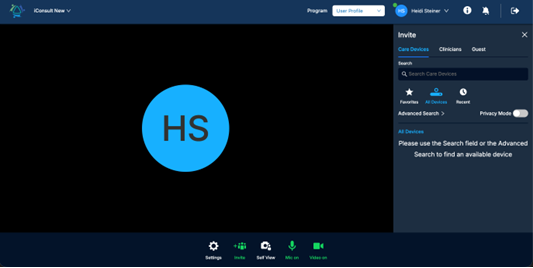
The new iConsult UI has a cleaner design, a more intuitive experience, and fewer clicks. We are introducing it gradually so customers have time to transition to the new experience.
The Classic UI will remain the default until CARES 26.11. The new interface will become the standard beginning with CARES 26.11, and the Classic UI will retire in CARES 27.1.
Other enhancements in CARES 26.11 include,
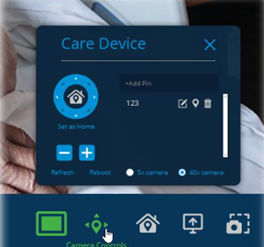
Easier Camera Controls: Click-and-drag makes it easier to control the camera. On dual-camera devices, refresh commands now apply only to the active camera.
Rooms configured as Private-Disabled now display correctly instead of appearing as Offline.
Mobile App Enhancements include:
Peek-In support is now available for IPC setups in the mobile app.
Monitoring in Progress indicator lets patients know when monitoring is active, helping with transparency and privacy.
In-call chat is now available for APD calls on both desktop and mobile.
Interpreter calling: Clinicians can invite an interpreter directly into a mobile call without requiring a Caregility device.
Patients can request a Propio interpreter directly from the APD mobile application.
Touch and Zoom: Users can use touch gestures to zoom into a video/image displayed on screen to support quick review of a specific area or point of interest.
Faster Alert Response: When clinicians respond to bedside alerts from the Notifications portal, they can connect directly to IPC devices without waiting-room prompts or time-outs.
Together, these updates make iConsult simpler, reduce the number of clicks, and create a more natural experience for clinicians and patients.
Making iObserver More Flexible
The recent enhancements make observation workflows easier to manage and more consistent.
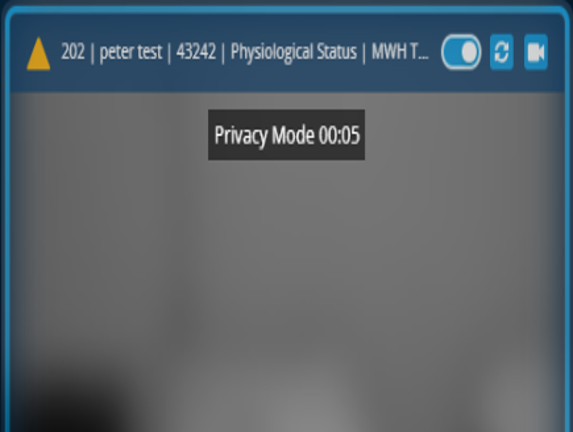
Privacy Mode status now carries over when an observation is handed off to another observer, ensuring that the privacy state follows the workflows rather than being lost in the transition.
Intervention reasons: Users can now record and track why an intervention was completed.
With the Auto-recording option, organizations can configure recording to begin automatically when an observation session begins.
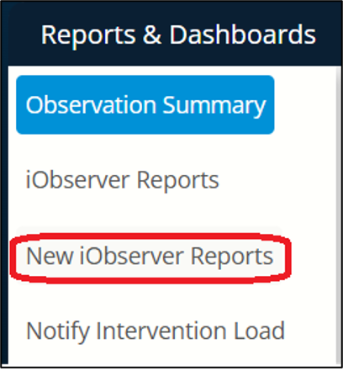
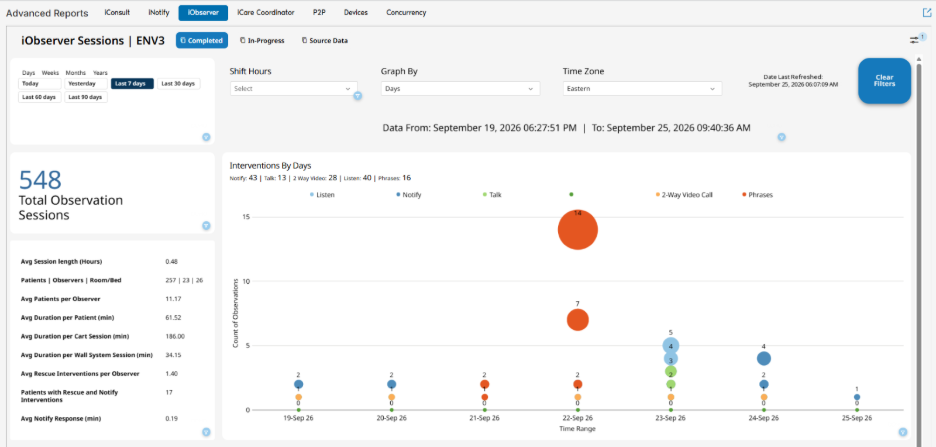
In CARES 26.9, the Advanced iObserver Report became directly accessible from the iObserver application. Users can launch it from the “New iObserver Reports” option.
We are also making these workflows more configurable.
Planned for CARES 27.1 in January 2027, customizable lists will allow care teams to manage options for Observation Reasons, Phrases, Patient Status and Intervention Reasons. Teams will be able to add, remove, and reorder options to match their clinical workflows. These lists will be managed centrally through Control Hub.
Control Hub: Managing the experience
Control Hubcontinues to evolve as the central place to manage devices, configurations, workflows, reporting, and integrations across the connected care environment.
In CARES 26.9, the Advanced iObserver Report became easier to access directly from iObserver. In CARES 26.11, we are taking the next step by replacing legacy reports with Advanced Reports.
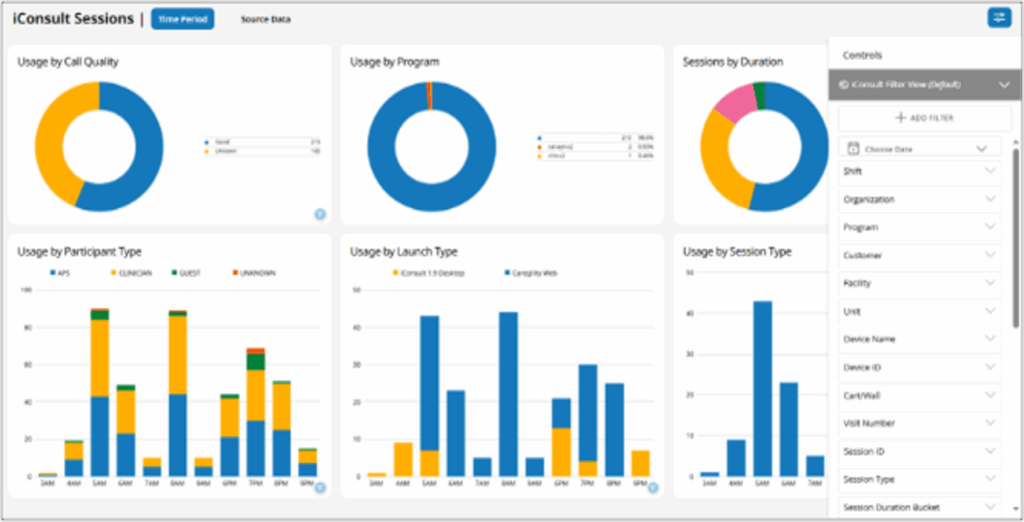
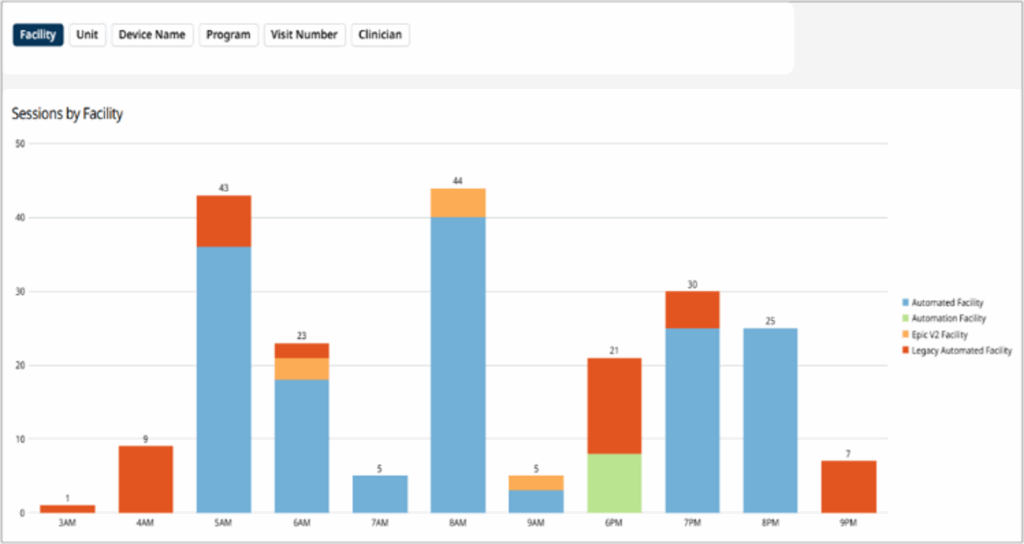
Flexible time-period selections for easier analysis across different date ranges
Enhanced “Graph By” options for greater flexibility in visualizing and analyzing data
The goal is to make the data easier to access and more useful for understanding how care is being delivered.
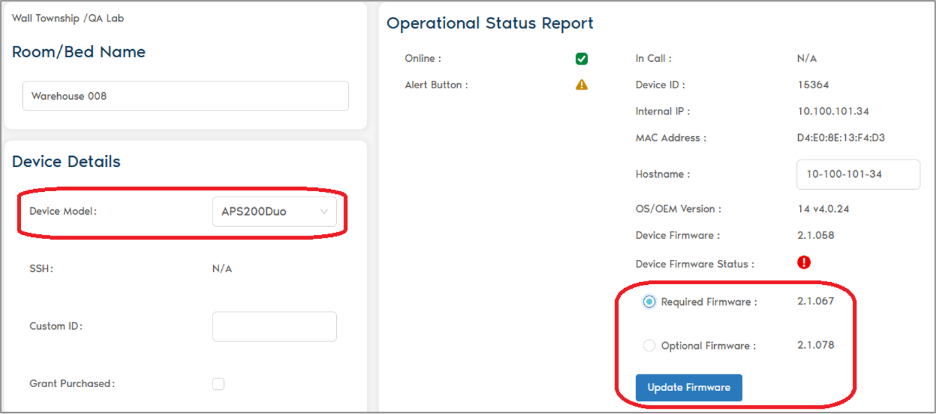
Control Hub is also expanding how administrators manage devices. Individual firmware upgrades will be available for Android devices running version 2.1.056 or later, alongside the current Linux firmware management capabilities, including support for Linux 3.x while maintaining compatibility with existing 2.x workflows.
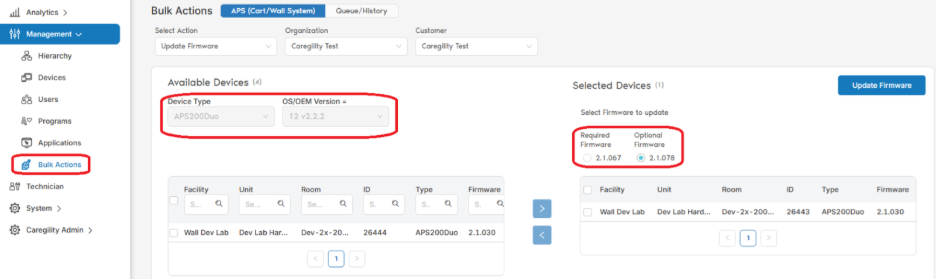
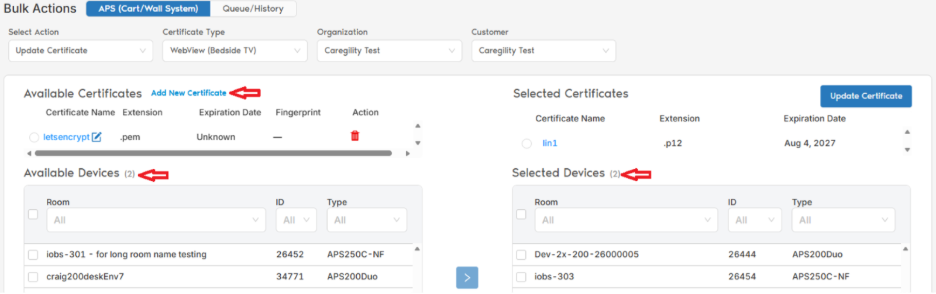
For larger device fleets, Bulk Actions will be centralized under Management > Bulk Actions. New options will allow administrators to update Epic Bedside and Enterprise Wi-Ficertificates across multiple eligible devices at once, reducing the need for repetitive device-by-device updates.
Together, these enhancements make Control Hub a more central and efficient place to manage the connected care environment, bringing insights, configuration, and device management into one experience.
From Digital to Natural
We have spent decades moving information from paper to digital systems. The next opportunity is bigger than simply digitizing workflows.
Paper asked clinicians to write.
Digital asked clinicians to click and type.
The next wave of technology will work naturally alongside clinicians giving them back their time and attention to focus on care.
That requires technology that understands context, responds naturally, and gets out of the way when it can.
A connected care environment brings together sensors, voice, computer vision, devices, and clinical workflows so they can work together naturally around the patient and care team.
That is the promise of moving from digital to natural.
Beyond ROI: Turning Virtual Care Data into a Performance Strategy
Health systems are investing significantly in virtual care to help address workforce challenges, improve access to clinical expertise, support patient safety, and streamline clinical workflow.
As these programs mature, however, leaders are asking a more complex set of questions:
Are we using our virtual care resources as effectively as possible? Which workflows produce the greatest impact? Where are there missed opportunities? How can we translate program activity into a credible financial and operational story?How do we make sure our virtual care program is operating as efficiently and effectively as possible on a continuous basis?
Answering those questions requires more than a count of virtual encounters, monitored patients, or enabled rooms. Health systems need a clearer way to connect virtual care activity with workforce utilization, quality performance, patient experience, operational efficiency, and financial value.
That is the purpose behind Caregility’s Lens on Organizational Performance, or LOOP.
Moving Beyond Utilization
Traditional virtual care reporting often focuses on what happened: how many sessions were completed, how frequently a workflow was used, or which departments generated the most activity. Those measures are important, but they do not always explain what the activity means for the organization and the patient experience.
For example, utilization data alone may not reveal:
Whether virtual workflows are helping staff work more efficiently
Where inconsistent adoption is limiting program value
Which departments have the greatest opportunity for improvement
How operational changes may affect staffing costs or resource allocation
Whether virtual care is contributing to quality, safety, or regulatory priorities
Where the organization should focus during its next phase of expansion
LOOP is designed to close that gap by bringing clinical, operational, financial, and virtual care data into a more unified performance-management framework. Rather than adding another disconnected report, LOOP helps health systems interpret the information they already have and use it to guide decisions.
As Caregility Chief Financial Officer Tod Nestor sees it, “Healthcare leaders should be able to see more than how frequently a technology is being used. They need a defensible understanding of the operational and financial impact they’re producing. This is not only important for ensuring a return-on-investment, but it is also critical to managing and optimizing virtual care programs on an ongoing basis. LOOP helps connect those dots so organizations can identify where value is being realized today and where additional opportunity may remain. It is not simply a point-in-time calculator, but a tremendous tool acting as the management operating system to optimize virtual care programs by floor and system-wide.”
Using the Data Health Systems Already Have
For many organizations, the information needed to assess virtual care performance already exists, but it may be distributed across different systems, departments, spreadsheets, and reports.
Clinical teams may track quality and safety indicators. Finance may monitor labor expenses, productivity, and departmental performance. Virtual care leaders may review technology utilization. Operational teams may maintain separate workflow or staffing data. Bringing those sources together can be time-consuming, and the analysis may arrive too late to influence meaningful change.
LOOP is intended to reduce that burden. Caregility works with customers to combine relevant organizational information with Caregility utilization data, helping reveal relationships that may not be visible in standard reports. The result is not simply a retrospective account of program activity. It is a more actionable view of:
Current performance
Historical trends
Variations among departments or facilities
Potential operational and financial opportunities
Areas that may require renewed workflow adoption
Logical next steps for program optimization or expansion
The process is designed to use data the organization already collects, without requiring protected health information or a major new data-gathering initiative.
Understanding Realized and Unrealized Value
One of the most useful questions LOOP can help organizations explore is the difference between the value a program is currently producing and the value it could potentially deliver. A health system may have the technology and workflows needed to support virtual nursing, patient observation, specialty consultation, or other connected care programs. Yet adoption may vary considerably among units. One department may use the program consistently, while another with similar staffing pressures or patient needs may use it only occasionally. A workflow may be integrated across an organization but not yet operating at the volume needed to generate its full potential benefit.
By examining performance at the organizational, facility, service-line, and departmental levels, LOOP can help leaders identify where variation exists and what may be driving it. That insight can support practical decisions, such as:
Reengaging departments where adoption has slowed
Refining staffing and coverage models
Standardizing effective workflows across facilities
Directing training and change-management resources
Identifying the next departments or use cases for expansion
Establishing baselines for future performance comparisons
In this way, LOOP is intended to be more than a one-time ROI calculation. It provides a framework for continuously evaluating how a connected care program is performing and where it should go next.
Connecting Financial and Clinical Priorities
The value of virtual care cannot be evaluated through a financial or clinical lens alone. A workflow that reduces labor requirements may also help clinicians spend more time on direct patient care. A program that supports fall prevention may contribute to patient safety, regulatory preparedness, and cost avoidance. Better access to experienced virtual nurses may help bedside teams manage workload while supporting less-experienced staff.
LOOP brings these perspectives together so that finance, nursing, operations, quality, and technology leaders can work from a more consistent view of performance. For nursing executives, that level of detail is especially important. Today’s department leaders are responsible not only for clinical quality but also for productivity, staffing, budgets, workforce sustainability, and regulatory performance.
“Nurse leaders are being asked to manage quality, workforce performance, productivity, and financial stewardship at the same time. They have become the CEOs of their clinical areas,” noted Caregility Chief Nursing Officer Susan Kristiniak, DHA, MSN, RN, NEA-BC, AHN-BC. “LOOP gives them a clearer view of how those factors intersect. It can help leaders identify where support is needed, recognize where teams are performing well, and give department managers information they can use to take meaningful action.”
The insights will help organizations’ leaders prepare conversations about quality reporting, patient-safety initiatives, budgeting, executive reviews, and future capital planning.
LOOP does not replace required regulatory reporting systems or local financial analysis. Instead, it can help surface and organize the utilization, workflow, productivity, and quality indicators that inform those activities.
From Measurement to Continuous Improvement
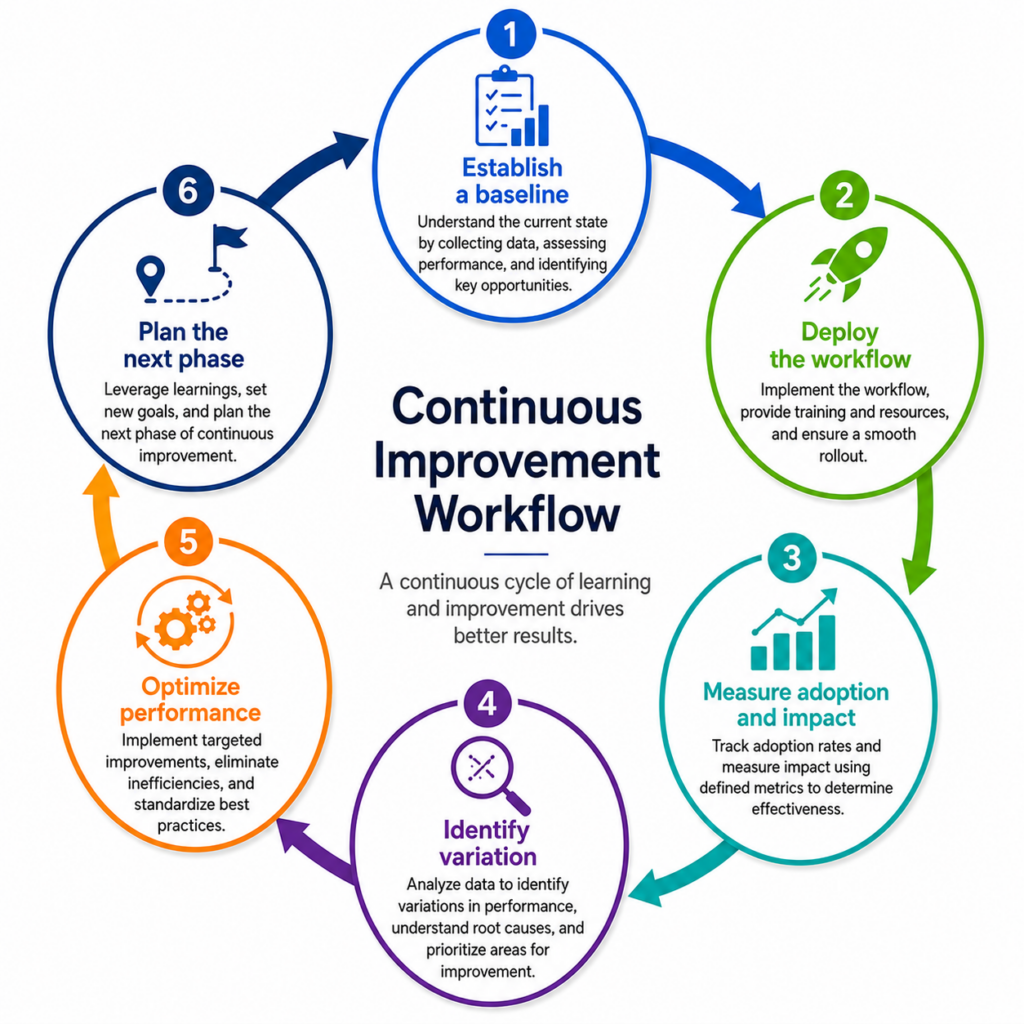
Virtual care performance should not be evaluated only when an organization is preparing a budget request or deciding whether to renew a technology investment. Measurement should be part of the program’s ongoing lifecycle:
Because LOOP can be applied at different stages of program maturity, organizations do not necessarily have to wait until a large-scale deployment is complete.
Before implementation, LOOP can help establish baselines, measurement priorities, and key performance indicators. Once workflows are live, those baselines can support pre- and post-implementation comparisons. As the program expands, the same framework can help leaders examine trends, compare departments, and assess new opportunities. Even if your virtual care program has already been deployed, LOOP can measure the pre- and post-implementation impact to assist in measuring your program’s success.
Over time, that creates a more repeatable approach to performance management—one that evolves alongside the organization’s virtual care strategy.
The central question is straightforward: How much more value could your virtual care program be delivering?
Explore Your Virtual Care Opportunity at the Caregility Customer Summit
Caregility customers attending the 2026 Caregility Customer Summit will have an opportunity to continue the LOOP conversation through dedicated one-on-one sessions with Caregility’s clinical and financial leaders. These working discussions allow participating customers an opportunity to explore their current program, consider potential cost-saving and performance-improvement opportunities, and learn how LOOP could support future business and operational reviews.
Customers will receive a personalized LOOP Scorecard and have an opportunity to explore the broader reporting and assessment resources Caregility developed to support virtual care performance management. Because the analysis is specific to each health system, these conversations are intended to go beyond generic benchmarks. They begin with the organization’s own goals, workflows, operational realities, and available data.
What’s New: Caregility Spring 2026 Platform Update
Author: Kedar Ganta, Chief Product, Technology, and AI Officer, Caregility
We are pleased to announce that the Caregility Connected Care™ Platform has earned Epic Toolbox certification for the second consecutive year. This continued recognition from Epic reflects our ongoing commitment to making it easier for health systems to integrate Caregility into existing clinical workflows built on Epic.
Following my January-March 2026 update, I want to share what we’ve been building across the Caregility Connected Care™ Platform this Spring.
The real value of a platform is not measured in features it delivers, but in what value it provides at the point of care. It is when a nurse can act without hesitation at 2 a.m. When care teams coordinate from a single, connected workspace. When operational issues are resolved before they reach clinicians. Our releases are designed with those moments in mind.
This quarter, we delivered two important platform releases – CARES 26.3 and CARES 26.5. Together, they expand our clinical capabilities and strengthen the platform foundation. I’ll highlight the key capabilities we’ve delivered and what’s ahead on our roadmap.
1. A More Reliable and Observable Platform
Proactive Device Intelligence
We strengthened fleet reliability by improving visibility across APS carts and wall systems. Fleet reliability is foundational. We are making it measurable.
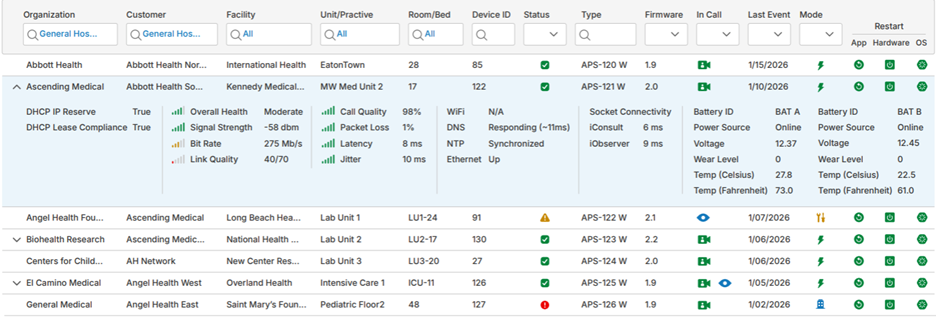
We have introduced Network and Battery Health Monitoring for APS cart and wall systems in Control Hub, enabling real-time insights into device connectivity and power status during standby and active use.
This feature applies to Linux devices running Firmware 3.44.86+ and OS 24.04+.
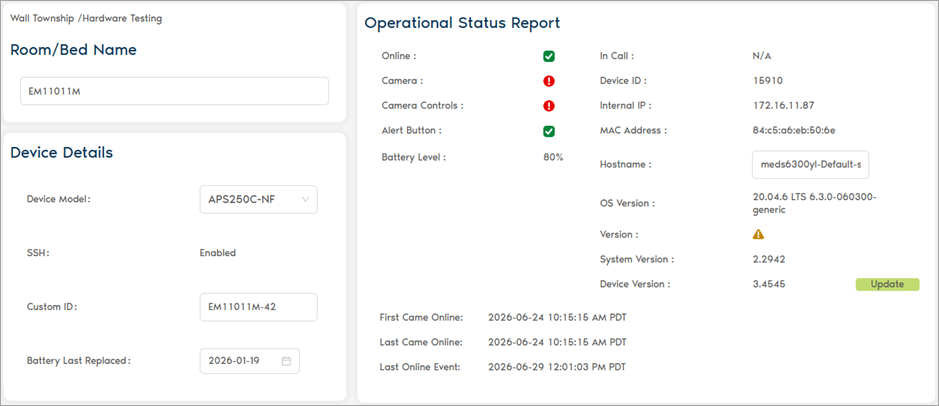
Device Details pages now expose SSH enablement status for APS devices, allowing secure remote diagnostics and faster issue resolution without on-site dependency.
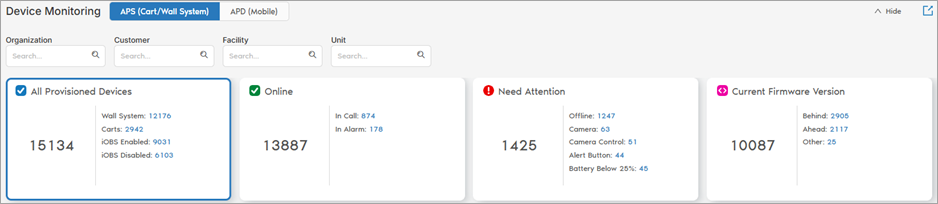
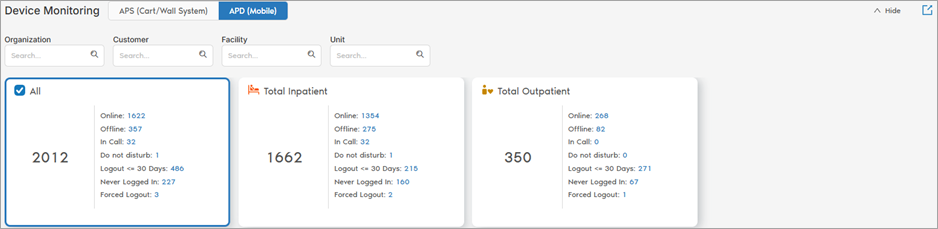
We’ve redesigned the Device Monitoring experience for both APS (cart and wall) and APD (mobile) devices to improve operational clarity at scale. Updated layouts reduce UI friction and allow faster scanning across large fleets, improving response time and situational awareness for the operations team. When you are managing dozens or hundreds of devices across a health system, visual clarity is not cosmetic. It is operational efficiency.
When something does need attention, resolution speed matters. These enhancements shift operations from reactive troubleshooting to proactive management.
2. Smarter Clinical and Administrative Workflows
iCare Coordinator (iCC)
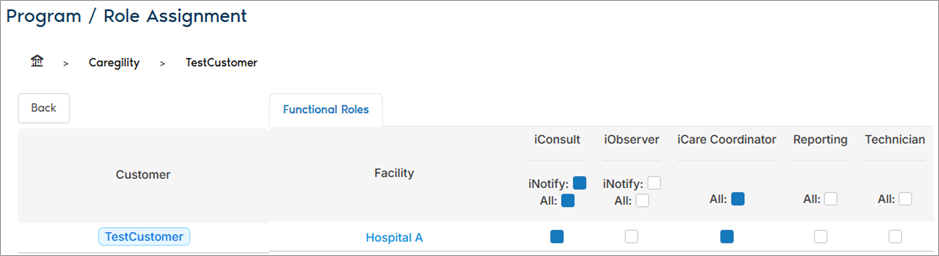
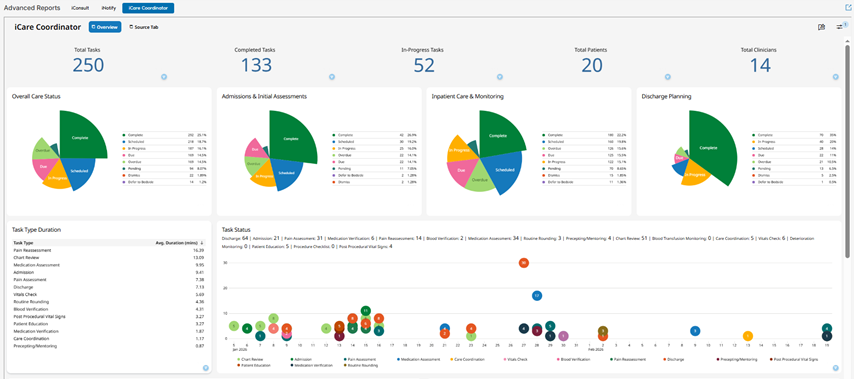
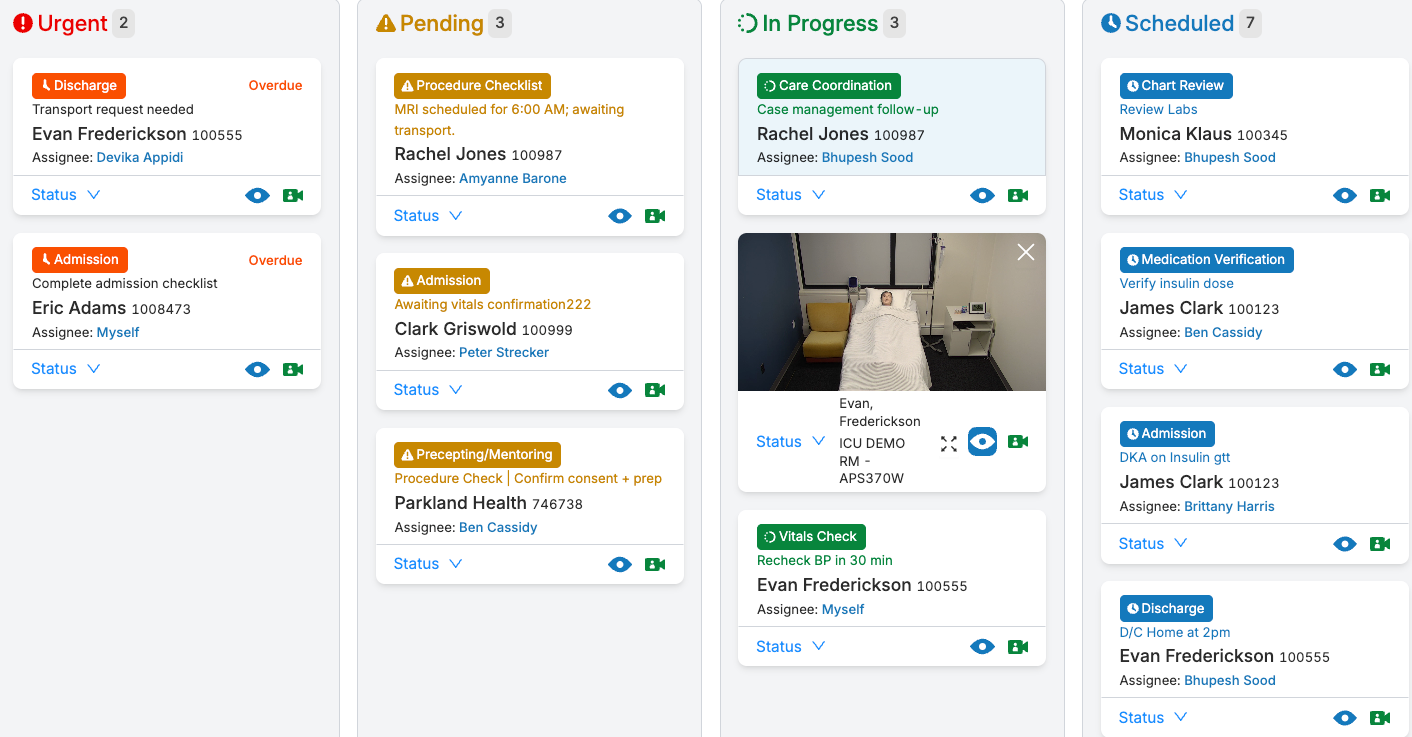
Administrative ownership is something you have asked for clearly and consistently. Admin teams can now fully manage iCC user permissions directly within Control Hub, without routing requests through Caregility. iCC is now integrated into Landing Page tiles and role-based access controls, creating a more unified and self-sufficient administrative experience across the platform.
iObserver: Reducing Friction in High Acuity Care
This quarter, we continued refining iObserver to improve responsiveness, coordination, and clinical clarity, providing greater control during patient observation.
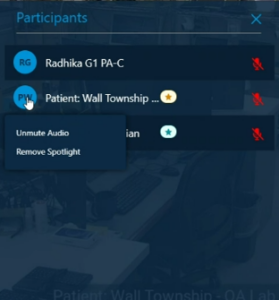
Secondary Spotlight is now available to all session participants. Previously designed to keep patients continuously visible for ASL interpreters, the capability now gives consistent patient visibility across multi-party care, including interpreters, family members, and clinicians.
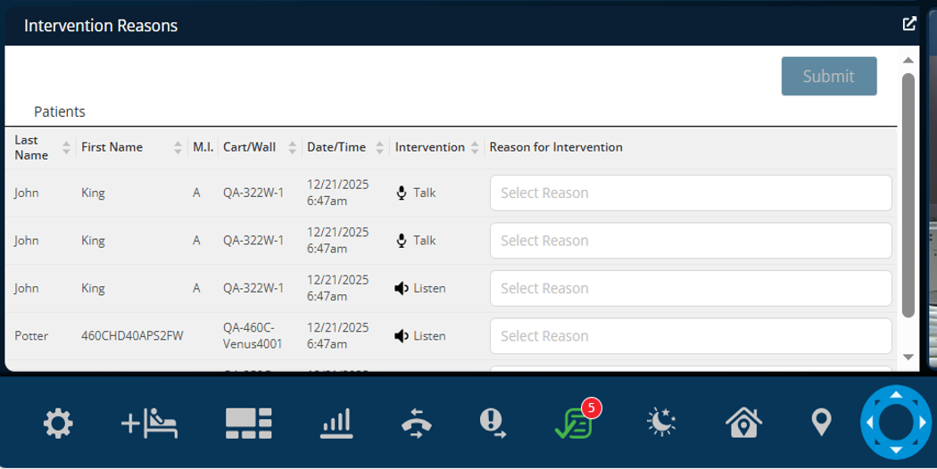
With Intervention Queue, observers can now move between patients during active observation, capturing intervention details at the appropriate time without disrupting care. Previously, observers were required to select an intervention reason immediately after clicking Listen, Talk, or Notify, interrupting their ability to respond quickly to multiple patients. This creates a faster and more efficient workflow for organizations managing high patient volumes or rapid-response observation programs.
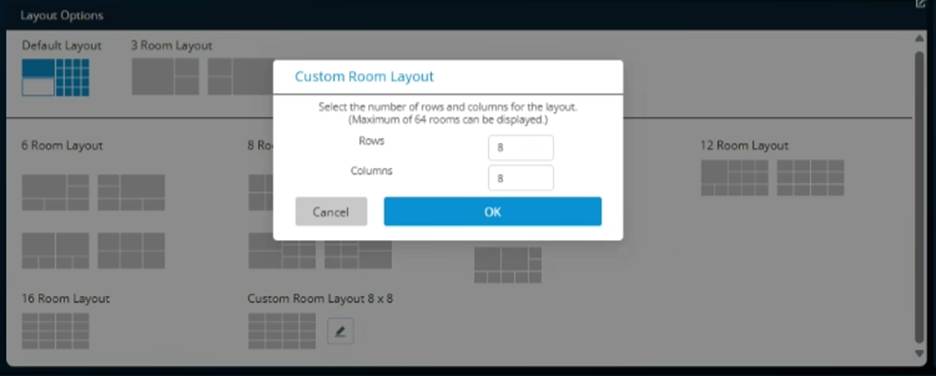
With dynamic layout scaling, managing large patient populations is now more intuitive. When adding more than 16 patients to a custom layout, patient grids now expand incrementally beyond 16 patients instead of automatically jumping to a 64-patient view. This gives observation teams greater flexibility to build layouts that match their current census and operational needs.
Synchronized camera allows both an observer and clinician to automatically share the active APS200 DUO 5x and 40x camera controls when both are dialed into the same session. Both users remain synchronized on the same visual context, reducing confusion during handoffs and collaborative patient assessments.
This capability has also been extended between iObserver and iConsult. Consultants now receive the observer’s active camera zoom level, ensuring they immediately orient to the same patient view. In addition, the double-click-to-center camera control has been refined, providing more precise positioning during virtual consultations.
P2P & iNotify
We streamlined virtual care interactions to reduce friction for both clinicians and patients. P2P and iNotify focus on making virtual interactions simpler, more efficient, and more reliable. From streamlining document sharing during telehealth visits to improving interpreter access and strengthening notification reliability, these enhancements reduce friction for both clinicians and patients.
Document sharing in chat: Clinicians can now send care instructions, consent forms, educational materials, and visit summaries directly through the chat during virtual visits.
Simplified user experience. A refreshed interface makes virtual visits easier to navigate for both clinicians and patients.
Faster interpreter search. Improved search capabilities help care teams quickly find the right interpreter and reduce delays in patient care.
Configurable session timeouts. Administrators can define behaviors for unattended sessions, especially what happens when a patient is waiting and a clinician has not yet joined, improving both operational efficiency and the patient experience.
Not every release is defined by new features. Sometimes the most meaningful improvements are those that make the platform more dependable every day.
In CARES 26.3, we improved iNotify by resolving issues related to time zone handling and enhancing notification export accuracy.
3. Intelligent Care at the Edge
Our strategy continues to focus on processing intelligence at the edge, keeping computation local, reducing latency, and keeping patient data on premises. This quarter, we advanced several capabilities that are generating strong interest.
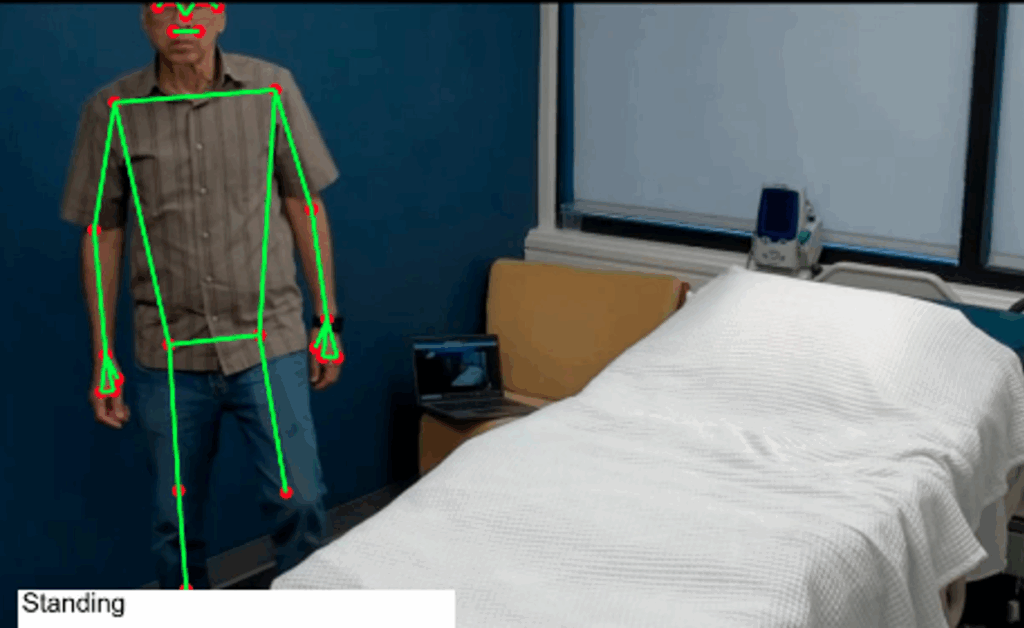
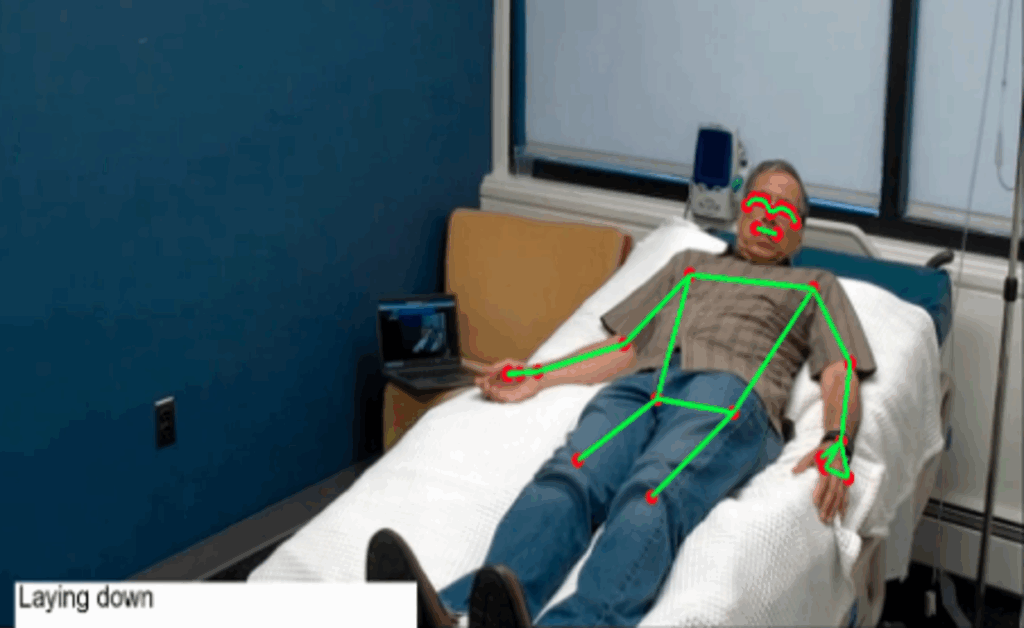
Smarter patient pose detection. Computer vision models for laying down, standing, and sitting have been refined to reduce false alerts and improve detection accuracy.
Faster awareness of room activity. The system now responds more quickly when someone enters the room, giving care teams greater confidence in observation alerts.
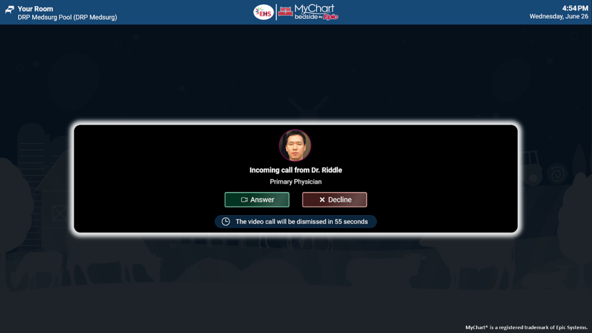
Epic Bedside TV integration. Patients and care teams can now participate in two-way video calls directly from Epic Bedside workflows.
More resilient connectivity. Improvements help maintain smoother operation during planned platform maintenance.
Enhanced APS200 camera management. Automatic camera position recovery helps restore proper alignment if a camera becomes misaligned, reducing manual intervention and improving system reliability.
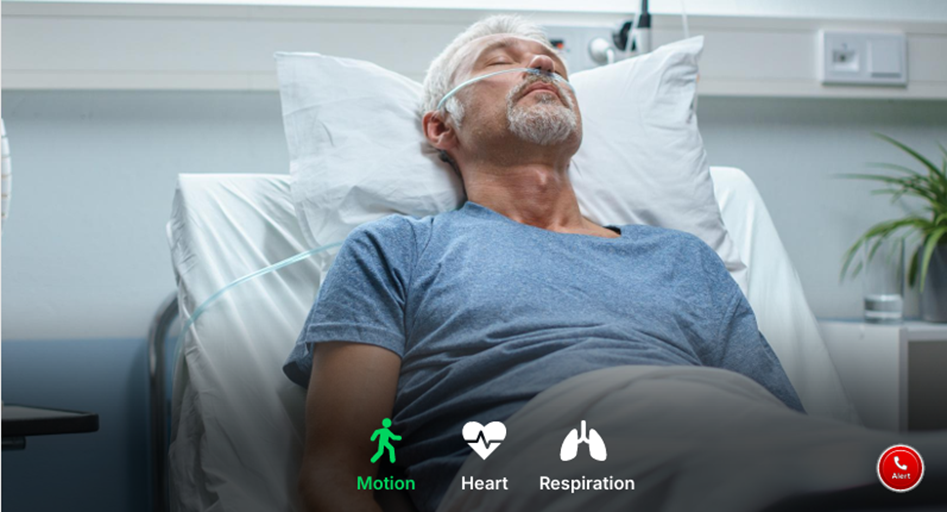
Looking further ahead, we are also advancing radar-based reading of patient movement and vital signs as an additional sensing layer within Augmented Observation. This modality requires no line-of-sight and extends monitoring into spaces where cameras cannot go, including privacy-sensitive areas. And in partnership with OneView, we are building a joint AI capability that produces context-aware patient communications and clinician follow-up. Watch this space.
In Conclusion
Each quarter, I return to the same question: what does the platform feel like to the person using it when it matters most?
Not in a demo environment, but during real care delivery at 2 am on a med-surg unit, during a rapid response, or at a shift handoff when every minute counts.
The updates we shipped are answers to that question.
Visibility before failure occurs – Proactive fleet monitoring
Coordination without unnecessary friction – From Epic Bedside TV experience to intervention queues to camera synchronization
Intelligence at the edge of care delivery – Pose detection refinements
And a platform that becomes more reliable with every release
Our goal is not to add complexity, but to remove it.
Author: Kedar Ganta, Chief Product, Technology, and AI Officer, Caregility
Following my December 2025 update, I received feedback from a hospital system that had deployed our Virtual Observation program across multiple units:
“We still have blind spots we cannot ignore – especially in spaces where cameras simply can’t go.“ That comment captures the tension we face in healthcare: how do we extend patient safety everywhere it’s needed while still respecting dignity and privacy?
One innovation I’m particularly excited about showcasing is our Radar-Based Monitoring – a silent observer in spaces where cameras don’t belong, such as restrooms and other privacy-sensitive areas. It is designed to act as a second layer of awareness, expanding monitoring capabilities while preserving patient dignity.
We’re also expanding what’s possible with sound captured directly from devices in patient rooms. This includes voice commands that allow patients and staff to trigger hands-free actions, monitor decibel levels for a more comfortable healing environment, and ambient documentation captured directly at the point of care.
We’ll also feature the AI Playback alongside our CUBE AI Server – both designed for operational realities of real-world hospital environments. We will be demonstrating these practical innovations, built responsibly, and designed to improve care in real hospital environments.
CUBE: Your Continuity Server
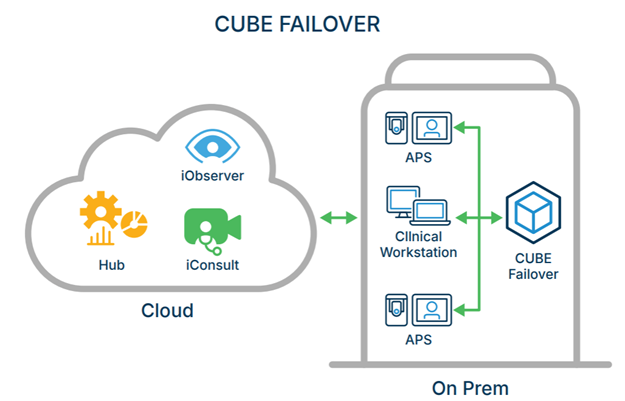
We’re introducing the CUBE server – Caregility Cloud Continuity Server. It’s designed for the scenario no one wants to think about, but everyone needs to prepare for: what happens when a disaster strikes?
When a hurricane hits, when a ransomware attack locks down your network, when a major cybersecurity incident cuts off access beyond your hospital network walls, CUBE keeps your virtual care running.
It’s a local failover that maintains care delivery continuity even when everything outside your four walls is disrupted. The financial and clinical impact of losing virtual care during a crisis is significant. CUBE is designed to eliminate that risk. We also offer CUBE AI server, a version that processes large AI workloads locally, extending our edge-first architecture.
January Platform Release
In January, we delivered significant workflow, intelligence, and compliance enhancements across iObserver, iConsult, our endpoints, and Control Hub.
iObserver Brings Smarter Monitoring Workflows
You can now download HL7 audit logs that capture names, encounter details, dates and times – the kind of record keeping that compliance teams need, and clinical teams increasingly rely on.
When clinicians and observers join the same session, we now share camera position signals between them. If an observer zooms to 5x or switches to 40x, clinicians can see which view is active to prevent confusion.
Session-transfer intelligence now preserves privacy mode settings and recording status when handing off a patient from one observer to another. These states persist through a successful transfer, ensuring continuity during handovers and shift changes.
iConsult Inpatient Consultation Enhancements
iConsult calls now feature default blurred background for better privacy during consultations.
We now support ‘second spotlight’ to keep the patient visible to ASL interpreters, allowing them to maintain visual contact for hearing impaired participants.
iConsult calls can be placed directly from Epic Mobile Apps (Rover, Canto, Haiku), with better interpreter lookup for language assistance.
Devices now display a busy message when occupied with another call, while maintaining auto-answer capabilities on bedside patient apps.
Control Hub Gets Better Visibility
Our command center is looking sharper with advanced reports (beta) for clinical notification.
Administrators can now view device connectivity status while devices are on standby and during active use, helping teams proactively monitor performance and manage their device fleet more effectively.
Track calls that are answered on the first push versus those requiring multiple attempts, with average response times for benchmarking. Drill down by program, call type, organization level, or individual user.
With up to 24 months of data visualization, you’ll gain insights you need to make informed operational decisions.
See which camera endpoints and tablets are online, offline, in a call, or inactive – visibility that helps teams manage endpoints and reduce disruptions across care environments.
Administrators can now better manage and plan the replacement of their Caregility carts’ batteries with battery health stats.
Endpoints Get Even Smarter
Our AI-augmented observation continues to evolve. The platform uses computer vision to detect when patients are standing, sitting, or lying in bed, capturing mobility signals that matter to clinicians.
We also applied computer vision to solve a common operational problem. When cleaning protocols require physical camera adjustments, cameras can lose their home position. Our latest release uses computer vision AI to quietly instruct camera endpoints to automatically resync to the privacy bookmark position without distracting the patient. This is the kind of practical intelligence that makes our endpoints truly smart.
Our approach to AI is deliberate, embedding intelligence that reduces friction without increasing cognitive load.
Continuing Our Focus on Intelligent Expansion
If you missed it, check out our recent announcement about AI-enhanced unlimited patient monitoring in iCare Coordinator. That adds unlimited continuous monitoring across patient rooms, limited only by individual choice. This means nurse managers now have a unified, real-time view of all rooms in a unit, giving them situational awareness. The vision is to bring AI into the mix to help caregivers act faster and smarter every day.
A Year of Momentum: Caregility’s Biggest Moments of 2025
Healthcare delivery continues to evolve as organizations look for new ways to support clinicians, improve operational efficiency, and deliver high-quality care across settings. Virtual care has become an essential part of that transformation—shifting from isolated use cases to enterprise-wide strategies that support teams at scale.
Throughout 2025, we continued to expand our Connected Care platform, partnerships, and capabilities to help health systems operationalize connected care. From new product launches and analytics tools to global expansion and deeper integrations, the year reflected steady progress toward more coordinated, data-driven, and scalable virtual care models.
Below are the 10 key milestones that shaped Caregility’s journey in 2025.
2. Launch of LOOP (Lens on Organizational Performance) Introduced our Lens on Organizational Performance (LOOP), a new analytics framework designed to help health systems quantify the operational, workforce, and financial impact of virtual care programs.
3. Launch of iCare Coordinator At HIMSS 2025, we launched iCare Coordinator – a centralized command hub that brings together virtual care workflows, task management, AI alerts, and bedside support requests into a single, streamlined dashboard.
5. Expanded Global Reach and International Partnerships Expanded our global footprint with new partners and deployments across Japan, Australia, the Middle East, Canada, and other international markets.
6. Epic Toolbox Designation for Inpatient Virtual Care Achieved designation in Epic’s Toolbox for Inpatient Virtual Care, reflecting deep integration with Epic workflows including CAL, ECAL, and Bedside TV.
8. Joint Research Initiative with Nagoya University Hospital Launched a research collaboration in Japan to explore AI-enabled virtual care models tailored to local healthcare needs and workforce challenges.
9. Significant Platform Enhancements Throughout 2025 Across 2025, Caregility released major platform updates, including Control Hub, interoperability upgrades, backend scalability improvements, expanded AI features (ambient listening, augmented observation), and accessibility enhancements.
10. Hosted a Successful Inaugural Customer Connect Summit Our customer community convened on Inova’s campus to share knowledge and ideas with speakers from Microsoft, Mayo, Johns Hopkins, Geisinger, and more!
Looking Ahead to 2026
As virtual care continues to evolve from isolated programs to enterprise strategies, 2025 reinforced Caregility’s role in helping health systems scale care, support clinicians, and deliver better patient experiences.
The momentum from this year sets the stage for continued innovation—and Caregility remains focused on helping connected care work in real-world clinical environments.
As December draws to a close, it’s remarkable how fast this year has passed. Time, as they say, is one of life’s true invariants. Throughout 2025, our team has advanced innovations that have reimagined how we make patient care smarter, safer, and more seamless, while keeping operational reliability at the forefront.
AI That Works Out of the Box
I clearly recall a conversation with a nurse manager who said, “We need technology that just works. We don’t have time or bandwidth to train your AI. And we certainly don’t want to worry about what data is leaving our hospital walls.” She was right, and she was far from alone.
The conversation reaffirmed what I already suspected: much of the approach to AI in healthcare was missing the mark. Many are pursuing increasingly sophisticated, cloud-based AI that requires extensive training and continuous patient data uploads.
So we built AI solutions that require no training. Our APS devices now deploy with AI that works the moment they are powered on. No lengthy setup, no configuration, and no patient data leaving the room. Once an APS is turned on in any patient room, it immediately understands: Is the patient standing, sitting, or lying down? Is there any fall risk? Are there early signs of bed sores? Has someone entered or exited the room?
Today, Caregility AI provides virtual bed rails, proactively identifies fall risks, maintains patient privacy screens, offers virtual backgrounds, detects room-based duress, responds to voice commands, and passively captures ambient clinical notes.
We deliberately kept the intelligence at the endpoint. While others ship data to the cloud – adding latency, risk, and operational complexity – we made the room itself intelligent. This breakthrough stems from our contrarian but deeply pragmatic view of AI.
Single Pane View of Care Management
Earlier this year, we introduced something our clinical stakeholders had been asking for: iCare Coordinator. It provides a true single-pane view of care management, bringing together all tasks and alerts required to manage patient care in one unified experience. This intuitive application is designed to reduce cognitive load and minimize context switching so clinical teams stay focused on what matters most: the patient. Caregility AI further augments care-related tasks by helping clinicians prioritize, anticipate, and act with greater efficiency.
In the middle of 2025, we crossed a significant milestone by completing a major platform uplift designed to support our continuous expansion and enterprise-scale growth to expand beyond 20,000 active patient rooms. This milestone establishes Caregility as the enterprise baseline for virtual care, delivering real care at scale, every day. As we add new sensors, introduce new capabilities, and continue to invest in new technologies, we move beyond traditional virtual care toward the vision of smart care. The APS device becomes a central hub for room-based intelligence that understands the context of everything happening in the room. It does not just provide video feed; it knows what’s happening and helps the care team respond in a meaningful way.
Security, Compliance, and AI Validation
This month, when we achieved ISO 27001 and 27701 certifications, it felt like validation of everything we have built – not just the technology, but also the discipline and governance behind how we build and operate. Our AI continues to perform at a high level in real-world environments. Based on data from real rooms at customer sites, accuracy rates exceed 90%. User feedback confirms low false positives, even across different patient room layouts and care settings. We continue to validate performance across different environments to ensure reliability, consistency, and actionable insights.
If you believe your facility has a unique room configuration, we encourage you to work with your Clinical Program Manager to check AI accuracy on your APS endpoints for yourself.
Other Product Updates Across the Platform
While we were crossing these milestones, we have been shipping several improvements
Control Hub now provides access to new reporting with rich visualizations covering device health, call quality, and participant experience. Select reports are refreshed daily and can be exported to support internal dashboards. Device monitoring has been enhanced with battery tracking, firmware status, and comprehensive audit logs across organization, facility, and unit levels. In parallel, the SSO experience has been streamlined for secure, frictionless access across the enterprise.
APS Devices now offer in-room recording capabilities that securely store content on local storage servers for compliance, safety, and quality assurance. The APS100 FlexCam and HD40 cameras have been upgraded with software for smoother, more responsive pan, tilt, and zoom camera controls. Operating system upgrades (Android 14, Ubuntu 22.04), strengthen security while expanding support for peripheral devices. These advancements enable new AI-driven capabilities, including ambient listening to support bedside nurses, augmented observation capabilities, and intelligent non-video sensors that establish patient baselines and detect environmental changes beyond video alone.
iConsult updates simplify care interactions and improve the experience for patients and families. Interpreters can now be added to iConsult calls without requiring an APS device to be connected, reducing delays and friction at the bedside. We also resolved a spotlight issue, keeping the focus where it belongs—on the patient. In addition, screen sharing has been restored for calls to mobile devices, making it easier for families to follow along during care discussions.
iNotify has been enhanced to deliver critical alerts for room-based duress and urgent notifications, ensuring staff respond immediately to safety concerns and patient needs.
iObserver has evolved into a powerful monitoring hub with AI-driven alerts that track multiple patients using virtual bed rails. It can seamlessly share APS200 Duo and HD40 camera feeds between iObserver and iConsult sessions, enabling clinicians to conduct consultations and patient monitoring simultaneously. In addition, privacy settings and recording status now persist as monitoring sessions are transferred between observers, ensuring continuity during clinical handovers. Together, these enhancements improve situational awareness and responsiveness across the care environments.
Looking Ahead to 2026 – What’s Next
As we approach 2026, we’re expanding our global footprint while continuing to invest in transformative technologies, including Agentic AI. It is more than geography – it is about expanding what’s possible.
We’re not simply building new features; we are reimagining what it means to deliver smart, contextual care at scale.
Time may be an invariant, but what we do with it isn’t. Thank you for being part of this journey. Here’s to making every day of 2026 meaningful.
In healthcare, every detail matters – a few extra decibels can disturb a patient’s rest, or an extra click can add to the clinician’s burden. This July, we’ve released several enhancements that bring us closer to building a more inclusive and intelligent connected platform.
Designing for Everyone with a Focus on Accessibility
We looked at our platform and asked ourselves the question: What more can we do to support every user? This means designing for everyone across different abilities, languages, cognitive needs, and preferences.
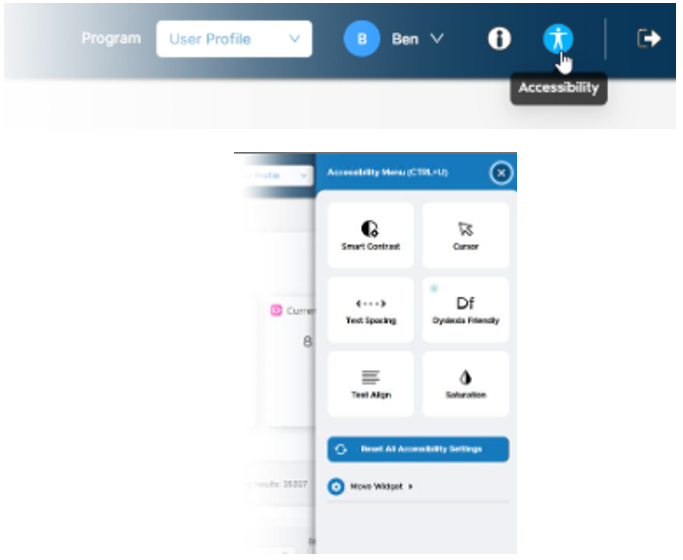
In this release, we’ve introduced a new Accessibility Widget in the Global Header for both Control Hub and iCare Coordinator. This small but meaningful addition allows users to personalize their experience with features like adjusting smart contrast, dyslexia-friendly fonts, adjustable text spacing, and cursor enhancements for better visual clarity. It’s one of the many steps in building a more inclusive platform. We are actively seeking your input to shape what comes next so everyone can navigate through our platform with ease, comfort, and confidence.
Clarity in the Control Hub
As your organization grows, so does the need to delegate access securely to manage operations. In this release, we’ve introduced a Read-Only Admin Role, allowing your system administrators to grant view-only access to certain key users. These users can now view and export data without the risk of making changes. To complement this, we are providing Bulk Program Association, enabling user admins to assign users to programs through a simple CSV import. It’s a small change that helps streamline onboarding and reduces friction in daily account management.
Device uptime and visibility continue to be a top priority for administrators. That’s why APS device endpoints now show new status indicators, giving administrators better diagnostics and real-time visibility into device uptime and activity. We are continuing to enhance device monitoring across different hierarchy levels in the upcoming release.
Intelligent Endpoints
Our APS endpoints are at the heart of every observation, call, and alert. We are evolving our endpoints into something more – an anchor in the patient room to power a more connected and intelligent ecosystem. In this release, we are making major updates to future-proof APS endpoints with OS upgrades to Android 14 and Ubuntu 22.04 for improved performance and security. We are expanding hardware compatibility with PDI, RCS, LG, and Samsung IPTV models to support two-way video calls, and to support USB peripheral devices like stethoscopes and video scopes for remote patient assessment. These changes will support emerging technologies and extend their value as a cornerstone of connected care delivery.
Sensing, Seeing, and Augmenting with AI
Our AI journey is well underway. We’re enabling various capabilities like Ambient Listening to detect distress signals in real time, Augmented Observation to monitor patient movement and behavior patterns, and Ambient Documentation to make clinical note-taking smarter. In our deployment of AI technology at some sites as part of our Early Field Trials, our computer vision technology is already showing promising results around accuracy rates. With each update, our AI becomes more deeply embedded into workflows, helping capabilities become more integrated into care delivery.
A Better Virtual Experience
This month, we’ve refined virtual consultations to be more seamless and engaging. Users can now enjoy a full-screen view, adjustable camera widget sizes, and integrated Propio interpreter services – all directly within the call experience. On mobile, we have optimized the interface by removing unwanted cross messages to make better use of screen space. Meanwhile, the iObserver application now includes key updates such as Privacy mode with screen blurring and expanded dashboard access for greater visibility and user control.
Our continued investment in human-centered platform design – from enhancing accessibility to advancing device intelligence and AI-powered experiences – reflects our commitment to building a platform that evolves with your needs and adapts to emerging technologies.
We look forward to hearing your feedback and to continuing this journey together.
Warm regards, Kedar Chief Product and Technology Officer
What’s New: Caregility May/June 2025 Update
Author: Kedar Ganta Date: June 2, 2025
As we reach the halfway point of the year, we have crossed a major milestone in our journey to support your evolving care models. Over the past few weeks, we completed an important upgrade to the Caregility Connected Care™ platform. This shift lays the foundation for faster innovation and stronger performance as we expand with you.
With the new platform foundation, we’ve moved our core backend services to a more modern and scalable architecture. You will experience a foundation that is built for enterprise-scale growth with better load times and deeper integrations between applications. Whether you are deploying our technology across a few units or hundreds of rooms, you will see the difference.
In tandem with platform upgrades, we rolled out a host of features across our product suite. These enhancements are designed to make your workflows tighter and operations smoother.
Observers often manage several patients at once, so everything counts. We made iObserver faster and easier to use by reducing login wait times. Observers can now trigger the ‘Notify’ alarm for multiple patients simultaneously while they are in a virtual session. Moreover, to keep things smooth, we enhanced the ‘Patient Successfully Added’ notification so that it fades away after a few seconds without requiring the user to click on the ‘OK’ button.
In the next release, we will continue to invest in adding additional phrases to our ‘Multilingual Phrases’ feature. We will also be expanding access for iObserver users so they can view dashboards.
Clinicians are juggling multiple priorities – managing numerous calls and staying responsive. In the recent release, we made iConsultmore customizable and polished by giving the ability to store up to 10 custom virtual backgrounds in the Control Hub. This means clinicians can select that background or setting that best suits their role, offering a personalized video presence experience. We also worked on alert fatigue by shortening the window from 4 hours to 1 hour to remove stale alerts. This helps ensure that only actionable, not outdated, alerts are shown on the screen.
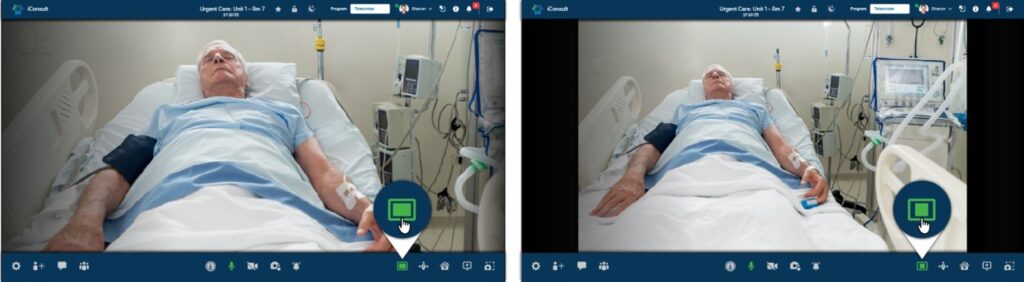
In the next release, we are making full-screen mode the default view during ad hoc calls, removing those inconvenient black bars to give a more immersive experience. Additionally, to help virtual teams stay aligned – especially across shifts – we are introducing real-time visibility. This new feature will let you see which team members are currently online, enabling more confident and informed decisions when escalating or assigning alerts.
On the AI front, we introduced a new Clinical Notes feature that is designed to make ambient note taking smarter. We are currently working with a few customers to get feedback on the workflows. Your input will help reduce documentation burden and improve charting accuracy for clinicians.
At their core, our APS endpoints are more than a device. They’re powered by multiple smart sensors that provide the input our Artificial Intelligence needs to generate meaningful insights! Stay tuned – we’ll be sharing more about the AI innovation we are bringing to the platform.
As technology evolves, APS endpoints will continue to advance along with these changes. We are updating the APS Linux OS to the 3.nn version to support AI-powered innovation. The new APS version retains all existing features while laying the foundation for smarter AI-driven capabilities. With added support for 5G and Starlink, APS endpoints can be deployed on the move, making it ideal for remote care. Keep an eye out for upcoming details where we discuss new medical peripherals, including USB-compatible video scopes and stethoscopes.
We are also making important investments in accessibility. Users will be able to adjust text size and color contrast directly from the screens using a built-in accessibility widget. In parallel, we are simplifying the data export process for Admin users, making it easier to manage and support.
These updates are a broader part of our investment in making our products more human-centered, responsive, and easier to use.
Warm regards, Kedar Chief Product and Technology Officer
What’s New: Caregility March 2025 Update
by Kedar Ganta, Chief Product and Engineering Officer, Caregility
March has been incredibly engaging and marked a true milestone for us.
Fresh off the energy from HIMSS 25, where we showcased our AI innovations – including computer vision, ambient intelligence, and native clinical notes – I’m excited to share how this momentum is translating into real-world applications for you. Over the past year, we’ve accelerated AI development, delivering production-ready solutions that assist with clinical documentation, improve patient monitoring, and reduce alert fatigue. Our vision is to rethink how AI-enabled technology transforms bedside care – augmenting nurses and remote clinicians while streamlining workflows and reducing cognitive burden.
Caregility’s native computer vision for patient observation
We’ve just rolled out a significant release featuring key improvements across our platform.
Virtual Visit Enhancements
In this March release, we prioritized enhancing the day-to-day user experience by streamlining login and logout flows for clinicians and patients. Additionally, we standardized alert notifications to consistently capture the ‘Joined’ status, regardless of whether alerts originate from mobile apps on tablets (APD), or camera endpoints (APS). Looking ahead, we will continue refining these improvements, focusing on minimizing unanswered alerts and giving clinicians more control during ad hoc Consultation Calls, with the flexibility to choose between full-screen and fit-to-screen viewing modes.
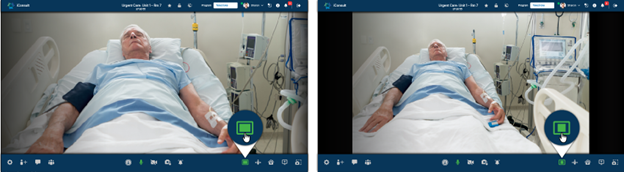
Fit-to-Screen and Full-Screen viewing options within Caregility CloudTM
Virtual Observation Enhancements
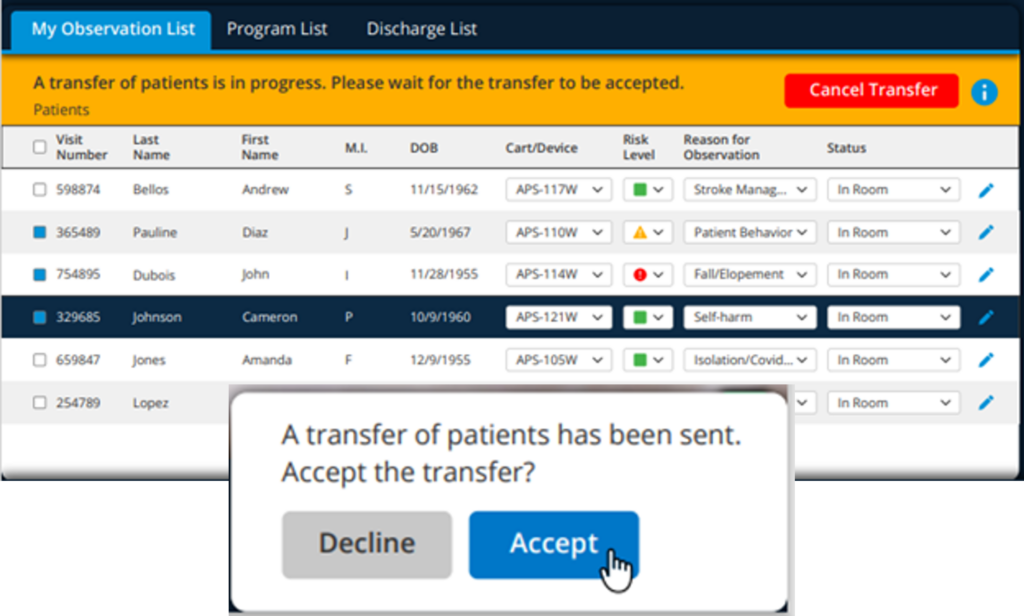
We know how important it is to have continuous patient observation. We have introduced a clear network signal strength indicator for video streams. We further enhanced Observation Workflows to simplify the transfer of observation duties between team members and make it easier to locate specific patients within large observation programs.
Patient transfer within Caregility iObserver
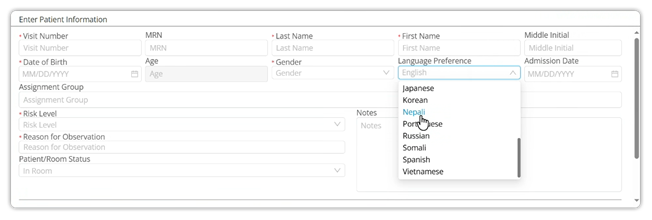
To break down language barriers, we have added support for additional languages like Nepali, Creole (Cape Verdean), and Portuguese, allowing observers to effectively engage with a wider range of patients.
New patient language preference selections within Caregility CloudTM
Platform Enhancements
Your Control Hubnow features a global header that allows you to navigate effortlessly between programs and a testing mode for quick workflow validation. We have also enhanced reporting capabilities to filter out test sessions to isolate accurate insights from real consultation and observation sessions. In the upcoming release, we are working on ways to give you more insights about the types of consultations that are happening within your program.
Telehealth Endpoint Enhancements
On camera endpoints (APS), we continue to improve resiliency. The March release includes improved connection stability between APS devices and televisions using RS-232 connections. Building on the existing compatibility with LG and Samsung TVs, we are expanding support to include IPTV devices. The APS270W now runs on the latest Caregility firmware (version 3.nn) and we plan to extend this update to other APS models. We are also enhancing the Linux and Android OS update process to ensure minimal disruption.
Excitingly, our APS devices are now compatible with Starlink and 5G cellular, opening up new possibilities for remote care. We are ready for early field trials (EFT), and your Caregility Sales contact can assist you in taking advantage of these capabilities.
We remain committed to advancing our AI roadmap and continuously enhancing our platform, and we greatly value your feedback in shaping our products. Currently, we are partnering with select customers on early field trials of computer vision and ambient documentation features. Furthermore, we are developing AI-augmented observation dashboards to get insights into patient mobility, fall risk events, and more. Thank you for your continued partnership, and we look forward to sharing further updates in the coming months.
by Kedar Ganta, Chief Product and Engineering Officer, Caregility
We are kicking off 2025 with exciting updates in our January release, including newly designed pages to elevate your experience with Caregility products.
Introducing the Control Hub
Last week, we unveiled Control Hub, your new centralized command center that allows you to:
Streamline device management with batch operations.
Easily manage and deploy the latest firmware updates across all endpoints.
Access dashboards and reports for actionable insights.
Control features across Caregility applications, endpoints, and partner integrations.
These enhancements are designed to provide a seamless, unified experience across all Caregility applications. We welcome your feedback as we continue to improve. Looking ahead, our March release will include the ability to easily switch between programs from the global header.
iConsult
Building on the positive feedback from our November 2024 release, we’ve made further enhancements:
Virtual backgrounds are now available for iConsult calls launched from third-party applications such as Epic.
Users’ background selection will now persist until manually changed or the user logs out.
Stay tuned for more iConsult updates, including a new doorbell feature to enhance privacy and user control, as well as improvements to call notification status.
iObserver
iObserverusers will notice several significant improvements:
The Program List can now be expanded into a separate full screen view, offering enlarged text and enhanced visibility to improve usability.
The new observer assignment filter streamlines and simplifies assignment management.
And there’s more to come in March! Our team is actively designing a new feature for partial transfer, enabling you to quickly send whole or partial assignments to another observer. Stay tuned for these exciting updates.
On the reporting front, the iObserver application’s Real Time Usage Monitoring now provides instant access to key application usage statistics, providing great insights such as all available endpoints by facility, average active sessions per observer, and total number of sessions.
These tools empower administrators with data to drive efficiency and make informed decisions.
ExpandingInteroperability and Connectivity
This year, we are continuing to make your Caregility APS endpoints smarter and more interoperable:
TV Integrations: APS endpoints will integrate seamlessly with LG and Samsung TVs, as well as IPC partners. We will be making APS endpoints compatible with IPTV, making in-room communication effortless. Please reach out to us for a list of supported LG and Samsung TV models.
Extended Connectivity: In 2025, Caregility APS endpoints will be compatible with Starlink and 5G networks, enabling connectivity for mobile EMS units, sea vessels, and hospitals in remote locations. With this, any APS endpoint can connect your extended medical teams to areas once thought impossible.
We are excited about what’s ahead and look forward to sharing more updates with you. Let’s connect at the upcoming ViVE and HIMSS conferences if you or your team are attending. We’d love to hear your ideas and feedback in person!
Cookie Consent
We use cookies to improve your experience on our site. By using our site, you consent to cookies.
Cookie Preferences
Manage your cookie preferences below:
Essential cookies enable basic functions and are necessary for the proper function of the website.
Name
Description
Duration
Geolocation Config
This cookie is used to store the consent settings based on the visitor's location.
60 days
Cookie Preferences
This cookie is used to store the user's cookie consent preferences.
60 days
CloudFlare provides web performance and security solutions, enhancing site speed and protecting against threats.
These cookies are for internal use which allows Cloudflare to identify production issues on clients.
session
cf_chl_rc_m
These cookies are for internal use which allows Cloudflare to identify production issues on clients.
session
__cfruid
Used by the content network, Cloudflare, to identify trusted web traffic.
session
__cf_bm
Cloudflare's bot products identify and mitigate automated traffic to protect your site from bad bots. Cloudflare places the __cf_bm cookie on End User devices that access Customer sites that are protected by Bot Management or Bot Fight Mode. The __cf_bm cookie is necessary for the proper functioning of these bot solutions.
session
__cflb
When enabling session affinity with Cloudflare Load Balancer, Cloudflare sets a __cflb cookie with a unique value on the first response to the requesting client. Cloudflare routes future requests to the same origin, optimizing network resource usage. In the event of a failover, Cloudflare sets a new __cflb cookie to direct future requests to the failover pool.
session
_cfuvid
The _cfuvid cookie is only set when a site uses this option in a Rate Limiting Rule, and is only used to allow the Cloudflare WAF to distinguish individual users who share the same IP address.
session
cf_clearance
Whether a CAPTCHA or Javascript challenge has been solved.
session
__cfseq
Sequence rules uses cookies to track the order of requests a user has made and the time between requests and makes them available via Cloudflare Rules. This allows you to write rules that match valid or invalid sequences. The specific cookies used to validate sequences are called sequence cookies.
session
cf_ob_info
The cf_ob_info cookie provides information on: The HTTP Status Code returned by the origin web server. The Ray ID of the original failed request. The data center serving the traffic
session
cf_use_ob
The cf_use_ob cookie informs Cloudflare to fetch the requested resource from the Always Online cache on the designated port. Applicable values are: 0, 80, and 443. The cf_ob_info and cf_use_ob cookies are persistent cookies that expire after 30 seconds.
session
__cfwaitingroom
The __cfwaitingroom cookie is only used to track visitors that access a waiting room enabled host and path combination for a zone. Visitors using a browser that does not accept cookies cannot visit the host and path combination while the waiting room is active.
session
cf_chl_rc_i
These cookies are for internal use which allows Cloudflare to identify production issues on clients.
session
Statistics cookies collect information anonymously. This information helps us understand how visitors use our website.
Google Analytics is a powerful tool that tracks and analyzes website traffic for informed marketing decisions.
Contains information related to marketing campaigns of the user. These are shared with Google AdWords / Google Ads when the Google Ads and Google Analytics accounts are linked together.
90 days
__utma
ID used to identify users and sessions
2 years after last activity
__utmt
Used to monitor number of Google Analytics server requests
10 minutes
__utmb
Used to distinguish new sessions and visits. This cookie is set when the GA.js javascript library is loaded and there is no existing __utmb cookie. The cookie is updated every time data is sent to the Google Analytics server.
30 minutes after last activity
__utmc
Used only with old Urchin versions of Google Analytics and not with GA.js. Was used to distinguish between new sessions and visits at the end of a session.
End of session (browser)
__utmz
Contains information about the traffic source or campaign that directed user to the website. The cookie is set when the GA.js javascript is loaded and updated when data is sent to the Google Anaytics server
6 months after last activity
__utmv
Contains custom information set by the web developer via the _setCustomVar method in Google Analytics. This cookie is updated every time new data is sent to the Google Analytics server.
2 years after last activity
__utmx
Used to determine whether a user is included in an A / B or Multivariate test.
18 months
_ga
ID used to identify users
2 years
_gali
Used by Google Analytics to determine which links on a page are being clicked
30 seconds
_ga_
ID used to identify users
2 years
_gid
ID used to identify users for 24 hours after last activity
24 hours
_gat
Used to monitor number of Google Analytics server requests when using Google Tag Manager
1 minute
Google Tag Manager simplifies the management of marketing tags on your website without code changes.
Name
Description
Duration
td
Registers statistical data on users' behaviour on the website. Used for internal analytics by the website operator.
session
cookiePreferences
Registers cookie preferences of a user
2 years
Hotjar is a powerful analytics tool that helps you understand user behavior through heatmaps and session recordings.
Name
Description
Duration
_hjCachedUserAttributes
This cookie stores User Attributes which are sent through the Hotjar Identify API, whenever the user is not in the sample. These attributes will only be saved if the user interacts with a Hotjar Feedback tool.
session
_hjIncludedInSessionSample
This cookie is set to let Hotjar know whether that visitor is included in the data sampling defined by your site's daily session limit
30 minutes
_hjSession_
A cookie that holds the current session data. This ensues that subsequent requests within the session window will be attributed to the same Hotjar session.
30 minutes
_hjSessionUser_
Hotjar cookie that is set when a user first lands on a page with the Hotjar script. It is used to persist the Hotjar User ID, unique to that site on the browser. This ensures that behavior in subsequent visits to the same site will be attributed to the same user ID.
365 days
_hjSessionTooLarge
Causes Hotjar to stop collecting data if a session becomes too large. This is determined automatically by a signal from the WebSocket server if the session size exceeds the limit.
session
_hjSessionRejected
If present, this cookie will be set to 1 for the duration of a user’s session, if Hotjar rejected the session from connecting to our WebSocket due to server overload. This cookie is only applied in extremely rare situations to prevent severe performance issues.
session
_hjSessionResumed
A cookie that is set when a session/recording is reconnected to Hotjar servers after a break in connection.
session
hjViewportId
This cookie stores user viewport details such as size and dimensions.
Session
_hjSessionStorageTest
This cookie checks if the Hotjar Tracking Code can use Session Storage. If it can, a value of 1 is set.
Session
_hjTLDTest
When the Hotjar script executes we try to determine the most generic cookie path we should use, instead of the page hostname. This is done so that cookies can be shared across subdomains (where applicable). To determine this, we try to store the _hjTLDTest cookie for different URL substring alternatives until it fails. After this check, the cookie is removed.
session
_hjCookieTest
This cookie checks to see if the Hotjar Tracking Code can use cookies. If it can, a value of 1 is set.
Session
_hjUserAttributesHash
User Attributes sent through the Hotjar Identify API are cached for the duration of the session in order to know when an attribute has changed and needs to be updated.
session
_hjIncludedInPageviewSample
This cookie is set to let Hotjar know whether that visitor is included in the data sampling defined by your site's page view limit.
30 minutes
_hjLocalStorageTest
This cookie is used to check if the Hotjar Tracking Script can use local storage. If it can, a value of 1 is set in this cookie. The data stored in_hjLocalStorageTest has no expiration time, but it is deleted immediately after creating it so the expected storage time is under 100ms.
-
_hjHasCachedUserAttributes
This cookie sets when a user first lands on a page. Persists the Hotjar User ID which is unique to that site. Hotjar does not track users across different sites. Ensures data from subsequent visits to the same site are attributed to the same user ID.
365 days
_hjid
Hotjar cookie. This cookie is set when the customer first lands on a page with the Hotjar script. It is used to persist the random user ID, unique to that site on the browser. This ensures that behavior in subsequent visits to the same site will be attributed to the same user ID.
365 days
hj_visitor
hotjar uses cookies to enhance the user’s experience on our website, for example to complete forms, navigating the site, and identify returning users and offer related content. Users can control the use of cookies at the individual browser level.
Session
_hjIncludedInSample
Hotjar cookie. This session cookie is set to let Hotjar know whether that visitor is included in the sample which is used to generate funnels.
365 days
_hjClosedSurveyInvites
Hotjar cookie. This cookie is set once a visitor interacts with a Survey invitation modal popup. It is used to ensure that the same invite does not re-appear if it has already been shown.
365 days
_hjDonePolls
Hotjar cookie. This cookie is set once a visitor completes a poll using the Feedback Poll widget. It is used to ensure that the same poll does not re-appear if it has already been filled in.
365 days
_hjMinimizedPolls
Hotjar cookie. This cookie is set once a visitor minimizes a Feedback Poll widget. It is used to ensure that the widget stays minimizes when the visitor navigates through your site.
365 days
_hjDoneTestersWidgets
Hotjar cookie. This cookie is set once a visitor submits their information in the Recruit User Testers widget. It is used to ensure that the same form does not re-appear if it has already been filled in.
365 days
_hjMinimizedTestersWidgets
Hotjar cookie. This cookie is set once a visitor minimizes a Recruit User Testers widget. It is used to ensure that the widget stays minimizes when the visitor navigates through your site.
365 days
_hjShownFeedbackMessage
This cookie is set when a visitor minimizes or completes Incoming Feedback. This is done so that the Incoming Feedback will load as minimized immediately if they navigate to another page where it is set to show.
365 days
_hjFirstSeen
The cookie is set so Hotjar can track the beginning of the user's journey for a total session count. It does not contain any identifiable information.
30 minutes
_hjAbsoluteSessionInProgress
The cookie is set so Hotjar can track the beginning of the user's journey for a total session count. It does not contain any identifiable information.
30 minutes
_hjptid
This cookie is set for logged in users of Hotjar, who have Admin Team Member permissions. It is used during pricing experiments to show the Admin consistent pricing across the site.
session
Vimeo is a video hosting platform for high-quality content, ideal for creators and businesses to showcase their work.
Collects analytical tracking information about videos and enables the player to function properly.
2 years
sd_identity
Collects analytical tracking information about videos and enables the player to function properly.
2 years
continuous_play_v3
Used to keep track of whether continuous play is on or not for a user
2 years
Player
This first party cookie created by Vimeo is used to remember user’s player mode preferences.
1 minute
vuid
This first party cookie created by Vimeo is used to assign a Vimeo Analytics unique id.
1 minute
Marketing cookies are used to follow visitors to websites. The intention is to show ads that are relevant and engaging to the individual user.
Name
Description
Duration
hubspotutk
Hubspot
1 day
__hstc
Hubspot
6 months
__hstc
Hubspot
1 day
__hssrc
Hubspot
1 day
__hssc
Hubspot
1 day
HubSpot is an all-in-one marketing, sales, and customer service platform that streamlines business growth.
Name
Description
Duration
hs-messages-hide-welcome-message
This cookie is used to prevent the chat widget welcome message from appearing again for one day after it is dismissed.
1 day
hubspotapi-prefs
This is used with the hubspotapi cookie to remember whether the user checked the 'remember me' box (controls the expiration of the main cookie's authentication).
1 Year
hubspotapi
This cookie allows the user to access the app with the correct permissions.
7 days
__hs_opt_out
This cookie is used by the opt-in privacy policy to remember not to ask the visitor to accept cookies again.
13 months
hubspotapi-csrf
This is used for CSRF prevention - preventing third party websites from accessing your data. Expires after a year.
1 year
__hs_do_not_track
This cookie can be set to prevent the tracking code from sending any information to HubSpot.
13 months
__hs_cookie_cat_pref
This cookie is used to record the categories a visitor consented to.
6 months
__hs_initial_opt_in
This cookie is used to prevent the banner from always displaying when visitors are browsing in strict mode.
7 days
__hs_gpc_banner_dismiss
This cookie is used when the Global Privacy Control banner is dismissed.
180 days
hs_ab_test
This cookie is used to consistently serve visitors the same version of an A/B test page they’ve seen before.
session
__hs_notify_banner_dismiss
This cookie is used when the website uses a Notify consent banner type.
180 days
hs-messages-is-open
This cookie is used to determine and save whether the chat widget is open for future visits.
30 minutes
__hsmem
This cookie is set when visitors log in to a HubSpot-hosted site.
1 year
hs-membership-csrf
This cookie is used to ensure that content membership logins cannot be forged.
session
hs_langswitcher_choice
This cookie is used to save the visitor's selected language choice when viewing pages in multiple languages.
2 years
__hstc
The main cookie for tracking visitors.
13 months
hubspotutk
This cookie keeps track of a visitor's identity. It is passed to HubSpot on form submission and used when deduplicating contacts.
13 months
__hssc
This cookie keeps track of sessions.
30 minutes
__hssrc
Whenever HubSpot changes the session cookie, this cookie is also set to determine if the visitor has restarted their browser.
session
messagesUtk
This cookie is used to recognize visitors who chat with you via the chatflows tool. If the visitor leaves your site before they're added as a contact, they will have this cookie associated with their browser.
13 months
LinkedIn Insight is a web analytics service that tracks and reports website traffic.