For a growing number of expectant mothers, access to maternity care depends heavily on where they live.
The March of Dimes’ 2026 report, Nowhere to Go: Maternity Care Deserts Across the U.S., found that more than one-third of U.S. counties (34.6%) have no obstetric clinicians or birthing facilities. The divide is especially pronounced in rural America, where nearly 58% of counties lack an obstetric clinician, compared with approximately 19% of urban counties.
Meanwhile, labor and delivery services continue to disappear. At least 96 hospital labor and delivery units closed across 35 states between 2024 and early 2026. In nearly 60% of the affected counties, the facility that closed was the community’s only local option for giving birth.
The resulting maternity care deserts are not merely dots on a map. They represent mothers traveling farther for prenatal appointments, delaying care because transportation or time away from work is difficult, and navigating pregnancy without reliable access to specialists. Residents of maternity care deserts travel approximately three times longer, on average, to reach labor and delivery services than those in full-access counties.
For rural hospitals, the problem is equally complex. Maintaining local maternity services requires scarce clinical talent, sustainable patient volumes, and around-the-clock readiness. When even one clinician leaves or a service line closes, the effects can ripple across an entire region.
TMaH is a 10-year, state-based model focused on improving Medicaid and CHIP maternal health outcomes through whole-person care, stronger coordination, and more sustainable payment approaches. Fifteen participating state Medicaid agencies are working with managed care organizations, hospitals, rural health clinics, maternity providers, community organizations, and other partners to implement the model.
The program emphasizes several areas that are particularly relevant to rural communities:
Expanding access to maternal health providers, including midwives and doulas
Improving management of conditions such as hypertension and gestational diabetes
Integrating behavioral health, substance-use, and social-needs support
Strengthening postpartum care
Supporting telehealth and regional rural partnerships
Building the data and clinical infrastructure needed to measure and improve maternal health outcomes
TMaH is distinct from the broader Rural Health Transformation Program (RHTP), but the two share an important premise: lasting improvement will require new care-delivery models, not simply asking an already strained rural workforce to do more.
Extending Expertise Without Requiring It Everywhere
Virtual care can’t replace local obstetric services or eliminate the need for safe places to give birth. It can, however, help health systems distribute limited expertise more effectively and surround rural clinicians and patients with support that would otherwise be hours away.
Fractional shared service models can help here. A regional maternal health network might connect an academic medical center, maternal-fetal medicine practice, or health system hub with rural hospitals, critical access hospitals, clinics, and community-based providers. Through that network, virtual care could support:
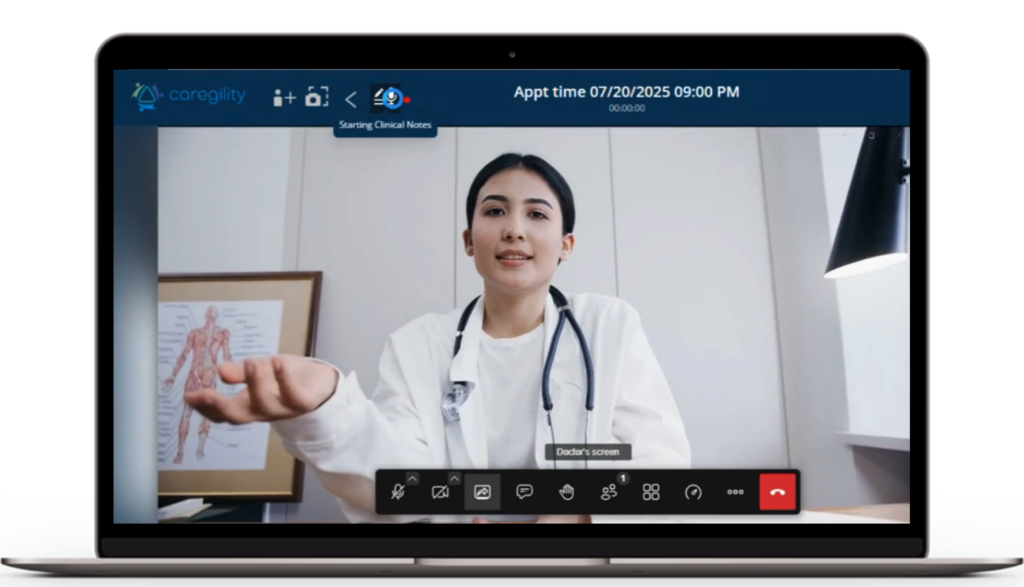
High-risk pregnancy consultation. Rural clinicians can bring maternal-fetal medicine and other specialists into prenatal visits without requiring every patient to make a multi-hour trip.
Remote monitoring and earlier intervention. Connected blood-pressure monitoring, diabetes management, and virtual check-ins can help care teams identify concerning changes between appointments and escalate care sooner.
Labor and delivery support. When specialty expertise is not available onsite, virtual consultation can help local teams evaluate risk, coordinate transfers, and manage time-sensitive situations.
Postpartum continuity. Virtual follow-up can make it easier to assess recovery, reinforce education, monitor hypertension, support lactation, and identify warning signs after a mother returns home.
Behavioral health and social support. Remote behavioral health clinicians, social workers, interpreters, and care navigators can help address needs that directly influence maternal outcomes but may be difficult to staff locally.
Workforce reinforcement. Virtual nurses and other remote team members can assist with patient education, documentation, discharge preparation, and safety checks, allowing onsite clinicians to focus on hands-on care.
The goal is not to recreate a tertiary maternity center in every rural community. It is to make the expertise of that center accessible wherever the patient and local care team happen to be. This offers rural health organizations a sustainable fractional service model that helps close maternal health gaps without there being an onus on rural providers to directly staff the department full time.
From Temporary Funding to Durable Capacity
The TMaH payment model creates a progression from infrastructure development to quality incentives and ultimately, value-based care. Participating states can use early funding to support care transformation and data infrastructure, followed by incentives tied to measures such as timely prenatal and postpartum care, depression screening and follow-up, Cesarean delivery rates, and severe obstetric complications.
That progression matters. Technology investments should not be viewed as isolated projects that disappear when grant funding ends. They should become part of a sustainable regional care model that expands access, supports the workforce, and generates measurable improvements over time.
Virtual care helps healthcare organizations build the infrastructure to connect patients, local care teams, and remote specialists across the health continuum. Hybrid care programs that weave virtual and in-person visits can support maternal health from prenatal consultation and monitoring through inpatient care and postpartum follow-up. This also establishes a foundation for health systems to extend remote or virtual workflows to other rural care priorities.
No mother should have fewer options simply because of her ZIP code. By combining local relationships with regional expertise and virtual connectivity, states and healthcare organizations have an opportunity to replace distance with access and build a stronger maternal health safety net for rural communities.
5 Reasons to Visit Caregility (Booth 3511) at HIMSS26
If you’re heading to HIMSS26 in Las Vegas, your schedule is probably filling up quickly with sessions, meetings, and exhibit hall excursions.
Why should Booth 3511 make your shortlist? Because we’re not just showing healthcare technology, we’re demonstrating how connected care works in real hospital environments.
Here are 5 reasons to stop by:
1. Experience the Connected Hospital Room of the Future
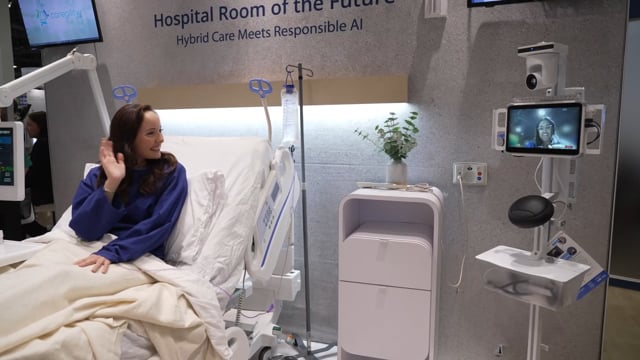
Step inside an operational patient-aware room, not a concept mockup. See how bedside sensors, remote workflows, and AI come together to support clinicians and patients.
2. See Smart Sensors in Action
Smart sensors for virtual engagement, continuous observation, computer vision, ambient listening, contactless vitals, and more give you situational awareness at every bedside.
3. Preview What’s New
Get hands-on with our latest innovations, including iCare Coordinator, LOOP, and CUBE, designed to deliver coordinated workflows, impact analytics, and scalable connected care.
4. Explore Seamless Integrations with Core Clinical Systems
See how Caregility supports seamless integration with Epic, nurse call systems, bedside TVs, connected devices, interpreters, clinical services providers, and more.
5. Learn How Connected Care Supports Nursing Teams
Learn how hospitals are using Virtual Nursing and other remote workflows to reduce clinician burnout, improve patient care, and modernize clinical workflows.
………………………………………………………………………………………………………………………….
Talk to experts with lived bedside experience. Stop by Caregility booth 3511 to have real conversations about challenges, outcomes, and strategies for future-proof innovation, gleaned from our team’s work with leading health systems around the globe.
If you’re ready to see how connected care works in practice, we’d love to meet you in Vegas!
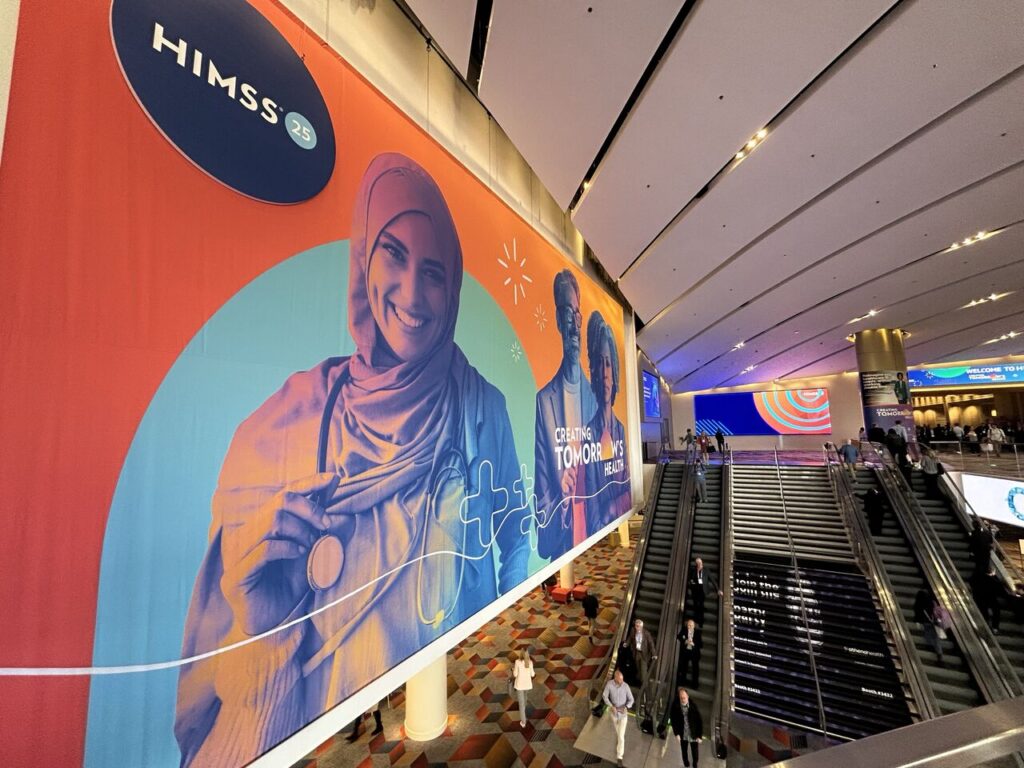
We had an incredible time in Las Vegas for the HIMSS 2025 conference, where we showcased the future of virtual care at our Hospital Room of the Future exhibit. Below we round up key highlights from the event, including video takeaways from members of our executive team, details on the new virtual care solutions we unveiled, and our HIMSS25 photo album. (Did you spot Ron Burgundy?!)
HIMSS Sizzle Reel
Catch a glimpse of our Room of the Future and hear from the Caregility leadership team on key trends and our solution roadmap.
New Solution Releases
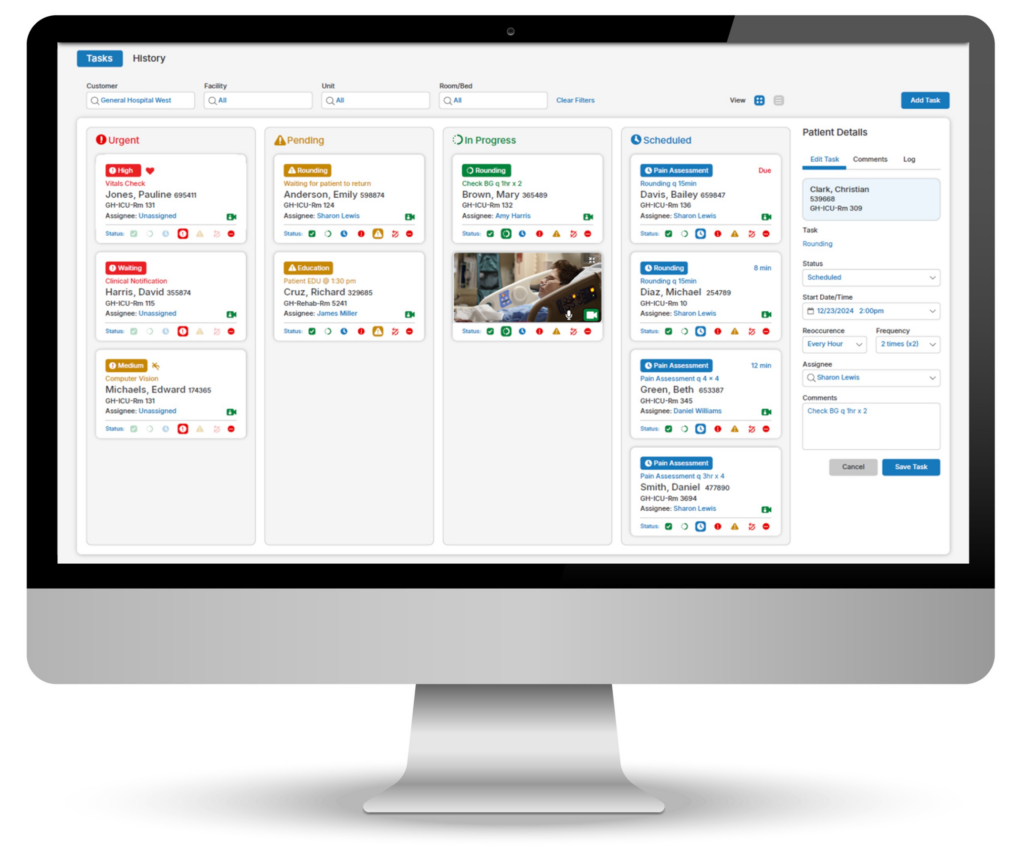
From our new iCare Coordinator app for Virtual Nursing care task management to our latest AI capabilities – we’re pushing the boundaries of care collaboration to better support patients and reimagine what clinical teams can achieve. Learn more about these solutions below. (Didn’t get a chance to demo at HIMSS? Set up a call to schedule your demo today!)
While at the show, Caregility President and COO Mike Brandofino, and Chief Nursing Officer Susan Kristiniak, MSN, RN, sat down with Healthcare IT Today editor Colin Hung to discuss the growing importance of virtual care in health systems and how the Room of the Future will change care delivery. Susan also sat down with Healthcare Radio Now podcast host Tom Foley for an episode of The Virtual Shift, where they discussed how telehealth and virtual nursing are reshaping care delivery and hospital operations.
You can find a comprehensive recap of everything we showcased at the conference at https://caregility.com/himss2025/. If you have follow-up questions or would like to continue your conversation from the show, please reach out to us here!
Digital Transformation and the Future of Acute Care
Healthcare delivery is changing rapidly as health systems adapt to modern-day obstacles and opportunities. Staffing challenges, clinician burnout, evolving patient expectations, and the accelerated pace of technological innovation are driving radical reinvention in acute care settings.
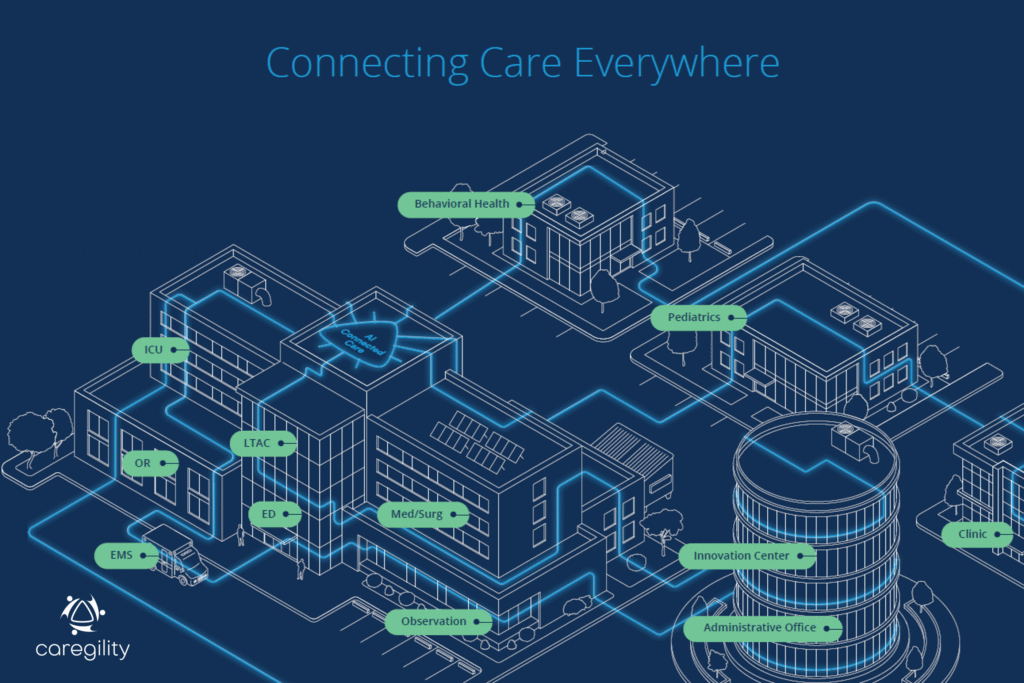
Most notably, virtual care and artificial intelligence (AI) are converging at the patient bedside to enable more agile workflows for care teams that improve outcomes, enhance capacity, and elevate patient and staff experience. AI-outfitted rooms, digital whiteboards, and remote support for no-touch patient care tasks are emerging as cornerstones in acute care of the future models.
For patients, the future of healthcare engagement is omnichannel, integrated, and digital-first. For clinicians, these advancements finally put clinical teams on par with other industries in terms of remote workflow support and digital enablement. As providers consider what the hospital room of the future will look like, there is an increased focus on making smart investments today in technologies that will help health systems most effectively work toward that future state.
Providers’ Digital Transformation Priorities
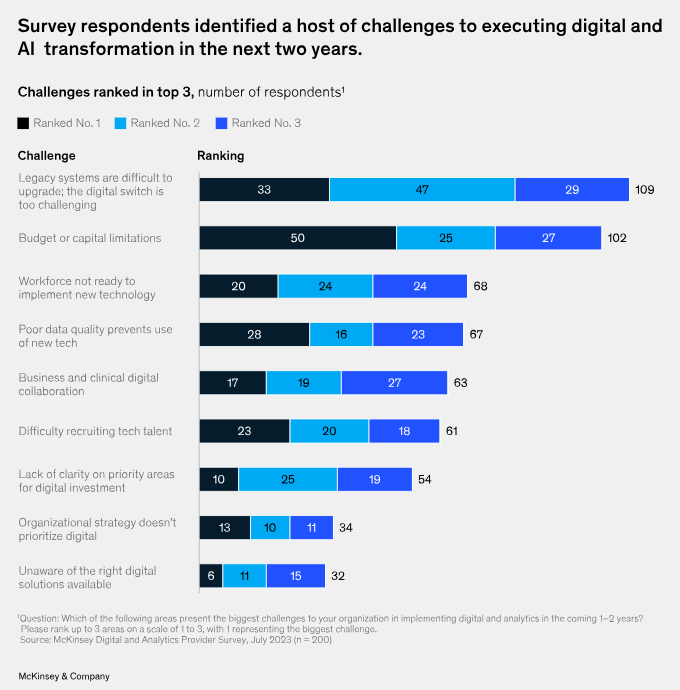
McKinsey & Company recently surveyed 200 global health system executives about their digital investment priorities and progress with results to date. 75% of respondents reported that their organizations place a high priority on digital and analytics transformation but lack sufficient resources or planning in this area.
70% of respondents flagged virtual care as one of the top three digital health priorities that will have the biggest impact on their organization. AI was the only digital health priority to edge out virtual care, with 88% of respondents indicating AI among the biggest potential areas of impact. Even so, roughly one in five respondents do not plan to invest in AI within the next two years.
What’s holding providers back from investing in these technologies? Some organizations are waiting out the early stage growing pains in health AI while others are taking a measured step with pilot program implementations. Roughly half of respondents cited budget and capital expenses as a key obstacle to investing at scale.
Virtual health to drive patient experience and access was cited as the digital investment area with the highest performance satisfaction level. And, as McKinsey reports, “Optimizing workflows to enable more appropriate delegation, with technical enablement, could yield a potential 15 to 30 percent net time savings over a 12-hour shift. This could help close the nursing workforce gap by up to 300,000 inpatient nurses.”
The Role of Virtual Care & AI in Acute CareTransformation
In the recent webinar “Acute Care of the Future: How Health Systems Should Position Themselves and How Geisinger is Getting Ahead,” hosted by AVIA, executives from Geisinger Health System, a leader in healthcare innovation, emphasized the importance of investing in and scaling the right digital health experiences. These digital health investments are setting the new standard for attracting patients and staff, driving efficiency, and improving processes.
Today the health system and Caregility customer site’s digital health portfolio includes virtual ICU, sepsis, observation, telemetry, and nursing programs. In 2023 over 73% of admissions and 58% of discharges were conducted virtually at Geisinger with executive leaders reporting several benefits:
Repurposed 12,000 hours for bedside staff due to fielding tasks virtually
3-hour reduction from order-to-admit to arrival from the unit (22% time savings)
20-minute reduction in time to discharge (11% time savings)
Geisinger executives emphasized that platforms and ecosystems that support multiple use cases are vital to providing relief and value to care teams. Ease of use is critical to the “stickiness” of these technologies, ensuring that they are adopted and utilized effectively.
Conclusion
The future of acute care lies in embracing digital health innovation to create more efficient, patient-centered, and agile healthcare systems. By investing in the right technologies, health systems can navigate the challenges of today and position themselves for success in the future. As we look ahead, the question we must continually ask ourselves is this: What investments can we make today to future-proof care delivery?
These cookies are for internal use which allows Cloudflare to identify production issues on clients.
session
cf_chl_rc_m
These cookies are for internal use which allows Cloudflare to identify production issues on clients.
session
__cfruid
Used by the content network, Cloudflare, to identify trusted web traffic.
session
__cf_bm
Cloudflare's bot products identify and mitigate automated traffic to protect your site from bad bots. Cloudflare places the __cf_bm cookie on End User devices that access Customer sites that are protected by Bot Management or Bot Fight Mode. The __cf_bm cookie is necessary for the proper functioning of these bot solutions.
session
__cflb
When enabling session affinity with Cloudflare Load Balancer, Cloudflare sets a __cflb cookie with a unique value on the first response to the requesting client. Cloudflare routes future requests to the same origin, optimizing network resource usage. In the event of a failover, Cloudflare sets a new __cflb cookie to direct future requests to the failover pool.
session
_cfuvid
The _cfuvid cookie is only set when a site uses this option in a Rate Limiting Rule, and is only used to allow the Cloudflare WAF to distinguish individual users who share the same IP address.
session
cf_clearance
Whether a CAPTCHA or Javascript challenge has been solved.
session
__cfseq
Sequence rules uses cookies to track the order of requests a user has made and the time between requests and makes them available via Cloudflare Rules. This allows you to write rules that match valid or invalid sequences. The specific cookies used to validate sequences are called sequence cookies.
session
cf_ob_info
The cf_ob_info cookie provides information on: The HTTP Status Code returned by the origin web server. The Ray ID of the original failed request. The data center serving the traffic
session
cf_use_ob
The cf_use_ob cookie informs Cloudflare to fetch the requested resource from the Always Online cache on the designated port. Applicable values are: 0, 80, and 443. The cf_ob_info and cf_use_ob cookies are persistent cookies that expire after 30 seconds.
session
__cfwaitingroom
The __cfwaitingroom cookie is only used to track visitors that access a waiting room enabled host and path combination for a zone. Visitors using a browser that does not accept cookies cannot visit the host and path combination while the waiting room is active.
session
cf_chl_rc_i
These cookies are for internal use which allows Cloudflare to identify production issues on clients.
session
Statistics cookies collect information anonymously. This information helps us understand how visitors use our website.
Google Analytics is a powerful tool that tracks and analyzes website traffic for informed marketing decisions.
Contains information related to marketing campaigns of the user. These are shared with Google AdWords / Google Ads when the Google Ads and Google Analytics accounts are linked together.
90 days
__utma
ID used to identify users and sessions
2 years after last activity
__utmt
Used to monitor number of Google Analytics server requests
10 minutes
__utmb
Used to distinguish new sessions and visits. This cookie is set when the GA.js javascript library is loaded and there is no existing __utmb cookie. The cookie is updated every time data is sent to the Google Analytics server.
30 minutes after last activity
__utmc
Used only with old Urchin versions of Google Analytics and not with GA.js. Was used to distinguish between new sessions and visits at the end of a session.
End of session (browser)
__utmz
Contains information about the traffic source or campaign that directed user to the website. The cookie is set when the GA.js javascript is loaded and updated when data is sent to the Google Anaytics server
6 months after last activity
__utmv
Contains custom information set by the web developer via the _setCustomVar method in Google Analytics. This cookie is updated every time new data is sent to the Google Analytics server.
2 years after last activity
__utmx
Used to determine whether a user is included in an A / B or Multivariate test.
18 months
_ga
ID used to identify users
2 years
_gali
Used by Google Analytics to determine which links on a page are being clicked
30 seconds
_ga_
ID used to identify users
2 years
_gid
ID used to identify users for 24 hours after last activity
24 hours
_gat
Used to monitor number of Google Analytics server requests when using Google Tag Manager
1 minute
Google Tag Manager simplifies the management of marketing tags on your website without code changes.
Name
Description
Duration
td
Registers statistical data on users' behaviour on the website. Used for internal analytics by the website operator.
session
cookiePreferences
Registers cookie preferences of a user
2 years
Hotjar is a powerful analytics tool that helps you understand user behavior through heatmaps and session recordings.
Name
Description
Duration
_hjCachedUserAttributes
This cookie stores User Attributes which are sent through the Hotjar Identify API, whenever the user is not in the sample. These attributes will only be saved if the user interacts with a Hotjar Feedback tool.
session
_hjIncludedInSessionSample
This cookie is set to let Hotjar know whether that visitor is included in the data sampling defined by your site's daily session limit
30 minutes
_hjSession_
A cookie that holds the current session data. This ensues that subsequent requests within the session window will be attributed to the same Hotjar session.
30 minutes
_hjSessionUser_
Hotjar cookie that is set when a user first lands on a page with the Hotjar script. It is used to persist the Hotjar User ID, unique to that site on the browser. This ensures that behavior in subsequent visits to the same site will be attributed to the same user ID.
365 days
_hjSessionTooLarge
Causes Hotjar to stop collecting data if a session becomes too large. This is determined automatically by a signal from the WebSocket server if the session size exceeds the limit.
session
_hjSessionRejected
If present, this cookie will be set to 1 for the duration of a user’s session, if Hotjar rejected the session from connecting to our WebSocket due to server overload. This cookie is only applied in extremely rare situations to prevent severe performance issues.
session
_hjSessionResumed
A cookie that is set when a session/recording is reconnected to Hotjar servers after a break in connection.
session
hjViewportId
This cookie stores user viewport details such as size and dimensions.
Session
_hjSessionStorageTest
This cookie checks if the Hotjar Tracking Code can use Session Storage. If it can, a value of 1 is set.
Session
_hjTLDTest
When the Hotjar script executes we try to determine the most generic cookie path we should use, instead of the page hostname. This is done so that cookies can be shared across subdomains (where applicable). To determine this, we try to store the _hjTLDTest cookie for different URL substring alternatives until it fails. After this check, the cookie is removed.
session
_hjCookieTest
This cookie checks to see if the Hotjar Tracking Code can use cookies. If it can, a value of 1 is set.
Session
_hjUserAttributesHash
User Attributes sent through the Hotjar Identify API are cached for the duration of the session in order to know when an attribute has changed and needs to be updated.
session
_hjIncludedInPageviewSample
This cookie is set to let Hotjar know whether that visitor is included in the data sampling defined by your site's page view limit.
30 minutes
_hjLocalStorageTest
This cookie is used to check if the Hotjar Tracking Script can use local storage. If it can, a value of 1 is set in this cookie. The data stored in_hjLocalStorageTest has no expiration time, but it is deleted immediately after creating it so the expected storage time is under 100ms.
-
_hjHasCachedUserAttributes
This cookie sets when a user first lands on a page. Persists the Hotjar User ID which is unique to that site. Hotjar does not track users across different sites. Ensures data from subsequent visits to the same site are attributed to the same user ID.
365 days
_hjid
Hotjar cookie. This cookie is set when the customer first lands on a page with the Hotjar script. It is used to persist the random user ID, unique to that site on the browser. This ensures that behavior in subsequent visits to the same site will be attributed to the same user ID.
365 days
hj_visitor
hotjar uses cookies to enhance the user’s experience on our website, for example to complete forms, navigating the site, and identify returning users and offer related content. Users can control the use of cookies at the individual browser level.
Session
_hjIncludedInSample
Hotjar cookie. This session cookie is set to let Hotjar know whether that visitor is included in the sample which is used to generate funnels.
365 days
_hjClosedSurveyInvites
Hotjar cookie. This cookie is set once a visitor interacts with a Survey invitation modal popup. It is used to ensure that the same invite does not re-appear if it has already been shown.
365 days
_hjDonePolls
Hotjar cookie. This cookie is set once a visitor completes a poll using the Feedback Poll widget. It is used to ensure that the same poll does not re-appear if it has already been filled in.
365 days
_hjMinimizedPolls
Hotjar cookie. This cookie is set once a visitor minimizes a Feedback Poll widget. It is used to ensure that the widget stays minimizes when the visitor navigates through your site.
365 days
_hjDoneTestersWidgets
Hotjar cookie. This cookie is set once a visitor submits their information in the Recruit User Testers widget. It is used to ensure that the same form does not re-appear if it has already been filled in.
365 days
_hjMinimizedTestersWidgets
Hotjar cookie. This cookie is set once a visitor minimizes a Recruit User Testers widget. It is used to ensure that the widget stays minimizes when the visitor navigates through your site.
365 days
_hjShownFeedbackMessage
This cookie is set when a visitor minimizes or completes Incoming Feedback. This is done so that the Incoming Feedback will load as minimized immediately if they navigate to another page where it is set to show.
365 days
_hjFirstSeen
The cookie is set so Hotjar can track the beginning of the user's journey for a total session count. It does not contain any identifiable information.
30 minutes
_hjAbsoluteSessionInProgress
The cookie is set so Hotjar can track the beginning of the user's journey for a total session count. It does not contain any identifiable information.
30 minutes
_hjptid
This cookie is set for logged in users of Hotjar, who have Admin Team Member permissions. It is used during pricing experiments to show the Admin consistent pricing across the site.
session
Vimeo is a video hosting platform for high-quality content, ideal for creators and businesses to showcase their work.
Collects analytical tracking information about videos and enables the player to function properly.
2 years
sd_identity
Collects analytical tracking information about videos and enables the player to function properly.
2 years
continuous_play_v3
Used to keep track of whether continuous play is on or not for a user
2 years
Player
This first party cookie created by Vimeo is used to remember user’s player mode preferences.
1 minute
vuid
This first party cookie created by Vimeo is used to assign a Vimeo Analytics unique id.
1 minute
Marketing cookies are used to follow visitors to websites. The intention is to show ads that are relevant and engaging to the individual user.
Name
Description
Duration
hubspotutk
Hubspot
1 day
__hstc
Hubspot
6 months
__hstc
Hubspot
1 day
__hssrc
Hubspot
1 day
__hssc
Hubspot
1 day
HubSpot is an all-in-one marketing, sales, and customer service platform that streamlines business growth.
Name
Description
Duration
hs-messages-hide-welcome-message
This cookie is used to prevent the chat widget welcome message from appearing again for one day after it is dismissed.
1 day
hubspotapi-prefs
This is used with the hubspotapi cookie to remember whether the user checked the 'remember me' box (controls the expiration of the main cookie's authentication).
1 Year
hubspotapi
This cookie allows the user to access the app with the correct permissions.
7 days
__hs_opt_out
This cookie is used by the opt-in privacy policy to remember not to ask the visitor to accept cookies again.
13 months
hubspotapi-csrf
This is used for CSRF prevention - preventing third party websites from accessing your data. Expires after a year.
1 year
__hs_do_not_track
This cookie can be set to prevent the tracking code from sending any information to HubSpot.
13 months
__hs_cookie_cat_pref
This cookie is used to record the categories a visitor consented to.
6 months
__hs_initial_opt_in
This cookie is used to prevent the banner from always displaying when visitors are browsing in strict mode.
7 days
__hs_gpc_banner_dismiss
This cookie is used when the Global Privacy Control banner is dismissed.
180 days
hs_ab_test
This cookie is used to consistently serve visitors the same version of an A/B test page they’ve seen before.
session
__hs_notify_banner_dismiss
This cookie is used when the website uses a Notify consent banner type.
180 days
hs-messages-is-open
This cookie is used to determine and save whether the chat widget is open for future visits.
30 minutes
__hsmem
This cookie is set when visitors log in to a HubSpot-hosted site.
1 year
hs-membership-csrf
This cookie is used to ensure that content membership logins cannot be forged.
session
hs_langswitcher_choice
This cookie is used to save the visitor's selected language choice when viewing pages in multiple languages.
2 years
__hstc
The main cookie for tracking visitors.
13 months
hubspotutk
This cookie keeps track of a visitor's identity. It is passed to HubSpot on form submission and used when deduplicating contacts.
13 months
__hssc
This cookie keeps track of sessions.
30 minutes
__hssrc
Whenever HubSpot changes the session cookie, this cookie is also set to determine if the visitor has restarted their browser.
session
messagesUtk
This cookie is used to recognize visitors who chat with you via the chatflows tool. If the visitor leaves your site before they're added as a contact, they will have this cookie associated with their browser.
13 months
LinkedIn Insight is a web analytics service that tracks and reports website traffic.