by Kedar Ganta, Chief Product and Engineering Officer, Caregility
March has been incredibly engaging and marked a true milestone for us.
Fresh off the energy from HIMSS 25, where we showcased our AI innovations – including computer vision, ambient intelligence, and native clinical notes – I’m excited to share how this momentum is translating into real-world applications for you. Over the past year, we’ve accelerated AI development, delivering production-ready solutions that assist with clinical documentation, improve patient monitoring, and reduce alert fatigue. Our vision is to rethink how AI-enabled technology transforms bedside care – augmenting nurses and remote clinicians while streamlining workflows and reducing cognitive burden.
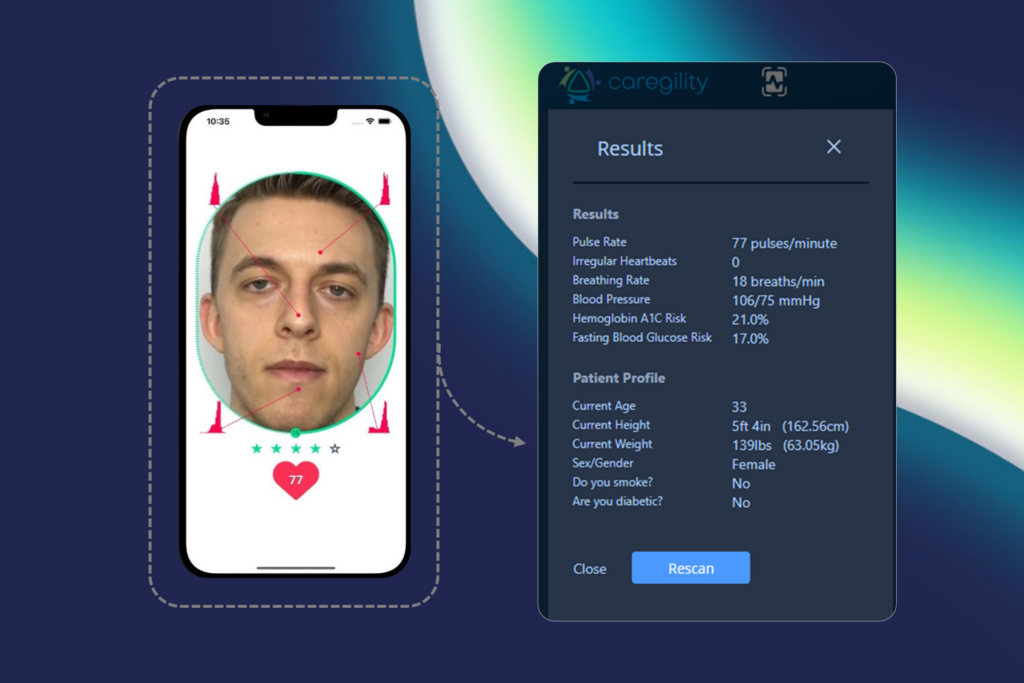
Caregility’s native computer vision for patient observation
We’ve just rolled out a significant release featuring key improvements across our platform.
Virtual Visit Enhancements
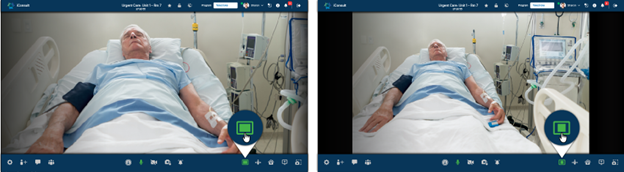
In this March release, we prioritized enhancing the day-to-day user experience by streamlining login and logout flows for clinicians and patients. Additionally, we standardized alert notifications to consistently capture the ‘Joined’ status, regardless of whether alerts originate from mobile apps on tablets (APD), or camera endpoints (APS). Looking ahead, we will continue refining these improvements, focusing on minimizing unanswered alerts and giving clinicians more control during ad hoc Consultation Calls, with the flexibility to choose between full-screen and fit-to-screen viewing modes.
Fit-to-Screen and Full-Screen viewing options within Caregility CloudTM
Virtual Observation Enhancements
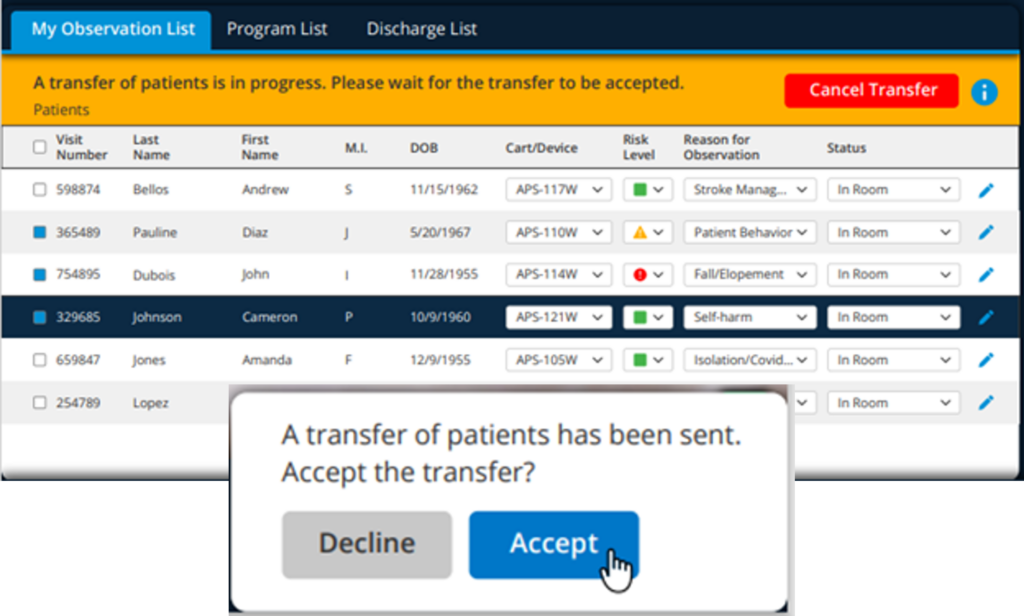
We know how important it is to have continuous patient observation. We have introduced a clear network signal strength indicator for video streams. We further enhanced Observation Workflows to simplify the transfer of observation duties between team members and make it easier to locate specific patients within large observation programs.
Patient transfer within Caregility iObserver
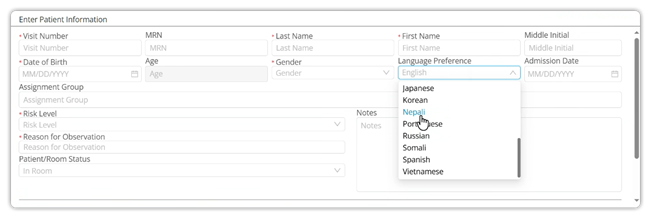
To break down language barriers, we have added support for additional languages like Nepali, Creole (Cape Verdean), and Portuguese, allowing observers to effectively engage with a wider range of patients.
New patient language preference selections within Caregility CloudTM
Platform Enhancements
Your Control Hubnow features a global header that allows you to navigate effortlessly between programs and a testing mode for quick workflow validation. We have also enhanced reporting capabilities to filter out test sessions to isolate accurate insights from real consultation and observation sessions. In the upcoming release, we are working on ways to give you more insights about the types of consultations that are happening within your program.
Telehealth Endpoint Enhancements
On camera endpoints (APS), we continue to improve resiliency. The March release includes improved connection stability between APS devices and televisions using RS-232 connections. Building on the existing compatibility with LG and Samsung TVs, we are expanding support to include IPTV devices. The APS270W now runs on the latest Caregility firmware (version 3.nn) and we plan to extend this update to other APS models. We are also enhancing the Linux and Android OS update process to ensure minimal disruption.
Excitingly, our APS devices are now compatible with Starlink and 5G cellular, opening up new possibilities for remote care. We are ready for early field trials (EFT), and your Caregility Sales contact can assist you in taking advantage of these capabilities.
We remain committed to advancing our AI roadmap and continuously enhancing our platform, and we greatly value your feedback in shaping our products. Currently, we are partnering with select customers on early field trials of computer vision and ambient documentation features. Furthermore, we are developing AI-augmented observation dashboards to get insights into patient mobility, fall risk events, and more. Thank you for your continued partnership, and we look forward to sharing further updates in the coming months.
by Kedar Ganta, Chief Product and Engineering Officer, Caregility
We are kicking off 2025 with exciting updates in our January release, including newly designed pages to elevate your experience with Caregility products.
Introducing the Control Hub
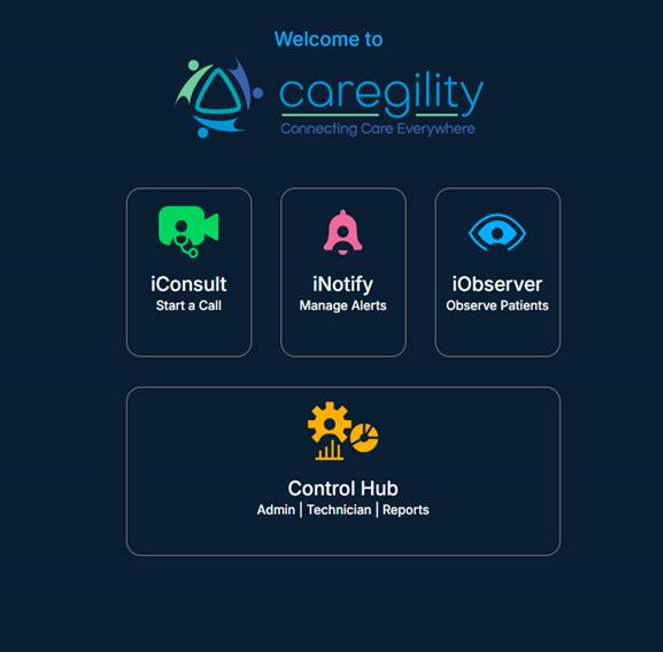
Last week, we unveiled Control Hub, your new centralized command center that allows you to:
Streamline device management with batch operations.
Easily manage and deploy the latest firmware updates across all endpoints.
Access dashboards and reports for actionable insights.
Control features across Caregility applications, endpoints, and partner integrations.
These enhancements are designed to provide a seamless, unified experience across all Caregility applications. We welcome your feedback as we continue to improve. Looking ahead, our March release will include the ability to easily switch between programs from the global header.
iConsult
Building on the positive feedback from our November 2024 release, we’ve made further enhancements:
Virtual backgrounds are now available for iConsult calls launched from third-party applications such as Epic.
Users’ background selection will now persist until manually changed or the user logs out.
Stay tuned for more iConsult updates, including a new doorbell feature to enhance privacy and user control, as well as improvements to call notification status.
iObserver
iObserverusers will notice several significant improvements:
The Program List can now be expanded into a separate full screen view, offering enlarged text and enhanced visibility to improve usability.
The new observer assignment filter streamlines and simplifies assignment management.
And there’s more to come in March! Our team is actively designing a new feature for partial transfer, enabling you to quickly send whole or partial assignments to another observer. Stay tuned for these exciting updates.
On the reporting front, the iObserver application’s Real Time Usage Monitoring now provides instant access to key application usage statistics, providing great insights such as all available endpoints by facility, average active sessions per observer, and total number of sessions.
These tools empower administrators with data to drive efficiency and make informed decisions.
ExpandingInteroperability and Connectivity
This year, we are continuing to make your Caregility APS endpoints smarter and more interoperable:
TV Integrations: APS endpoints will integrate seamlessly with LG and Samsung TVs, as well as IPC partners. We will be making APS endpoints compatible with IPTV, making in-room communication effortless. Please reach out to us for a list of supported LG and Samsung TV models.
Extended Connectivity: In 2025, Caregility APS endpoints will be compatible with Starlink and 5G networks, enabling connectivity for mobile EMS units, sea vessels, and hospitals in remote locations. With this, any APS endpoint can connect your extended medical teams to areas once thought impossible.
We are excited about what’s ahead and look forward to sharing more updates with you. Let’s connect at the upcoming ViVE and HIMSS conferences if you or your team are attending. We’d love to hear your ideas and feedback in person!
What’s New: Caregility November 2024 Update
by Kedar Ganta, Chief Product and Engineering Officer, Caregility
This is my final post of the year, and I would like to take a moment to share some key highlights that reflect our commitment to innovation and continuous improvement.
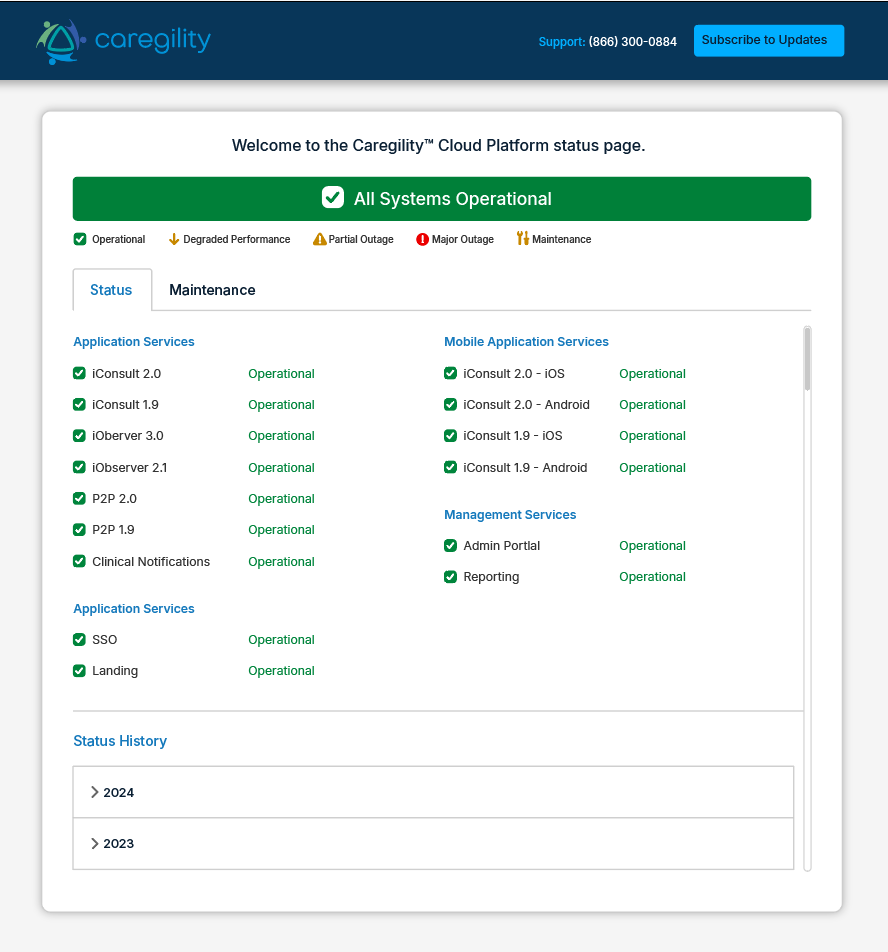
In 2024, we successfully rolled out 20 releases including 6 major updates and 14 minor ones. These releases were designed to improve your experience and keep us moving forward. We also launched a new status page (https://status.caregility.com) to provide real-time updates on the status of the Caregility applications to always keep you informed about our platform’s reliability.
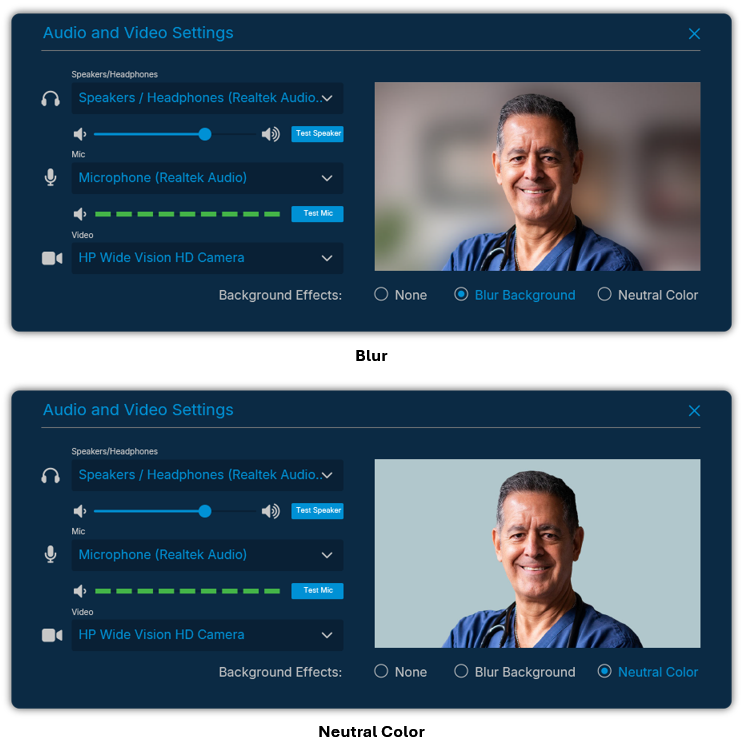
With the November 2024 release, we introduced a new virtual background feature in iConsult. This enhancement minimizes distractions by removing irrelevant background elements during virtual sessions. For now, you can blur or set a neutral color as your background, and in future releases, we will offer the ability to choose and personalize your background for a more tailored experience.
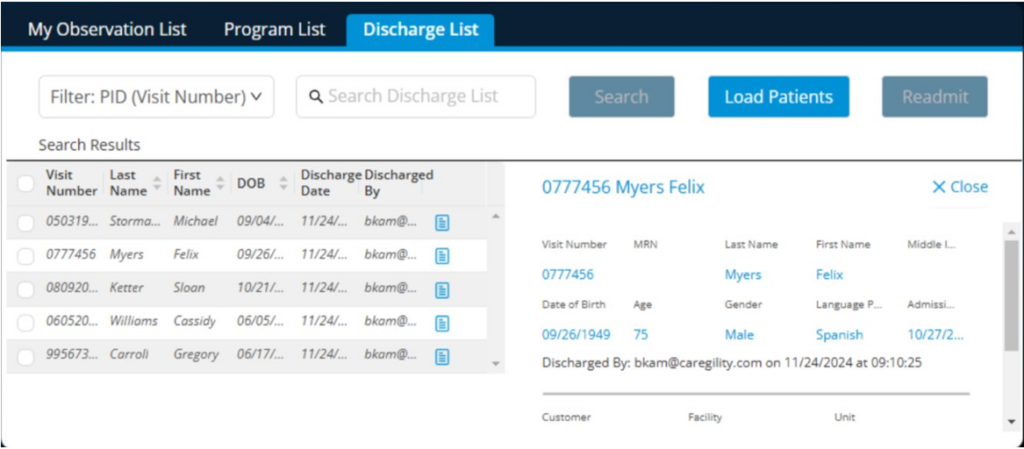
In iObserver, we made significant improvements to the way observers interact with live sessions. The recent release enables multi-camera streaming with independent 5x and 40x options on the APS 200 Duo and APS 100 Pro + Flex Cam endpoints, offering greater flexibility and detail. We also enhanced the Discharge List to provide increased visibility by tracking when and by whom patients are discharged. Color-coded tooltips and additional language phrases improve usability and accessibility.
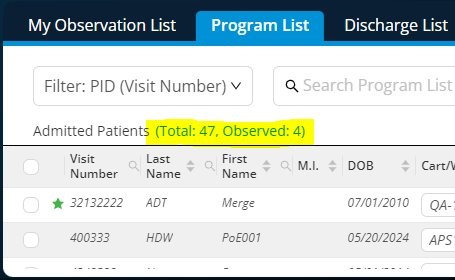
iObserver 3.0 also introduces Admitted Patient Statistics to the Program List, offering quick insights into patients on the list and those under observation. Look out for even more enhancements, including real-time reporting on active sessions, device availability, and assignment metrics in future updates.
Meanwhile, the Admin Portal is evolving into a central command hub, making device management more intuitive. With new features like scheduling soft reboots on APS endpoints, we aim to streamline operations and minimize downtime to better support your needs.
As 2024 draws to a close, I want to thank you for your feedback and engagement throughout the year. Wishing you all a happy holiday season, and I look forward to continuing our conversation in the new year!
Author: Kedar Ganta, Chief Product and Engineering Officer, Caregility
In my last post, I introduced our new family of dual-camera telehealth devices. Today, I want to share about additional workflow enhancements made possible through our ongoing platform innovation and integrations with new ecosystem partners.
iConsult
Our recent partnerships with Sonifi and Cyracom significantly enhance inpatient workflows with iConsult. Integration with Sonifi’s interactive patient engagement solutions offers patients a more comfortable and satisfying experience directly in their rooms. Meanwhile, Cyracom’s on-demand language interpretation services within iConsult effectively bridge language barriers and improve overall quality of care. iConsult now makes it easier to identify the location of patients using interpreter services, simplifying the internal billing process and improving overall efficiency.
iConsult P2P
In our outpatient iConsult P2P solution, the new polling feature enables group outpatient visits to become more dynamic and interactive. This allows healthcare teams to collect real-time feedback on patient needs, concerns, and preferences.
Also, don’t miss out on experiencing the AI-driven vitals scanning available within our P2P application. Using non-invasive computer vision technology, P2P analyzes a video stream of a patient’s face to measure vital signs such as heart rate, blood pressure, and respiratory rate.
iObserver
With the September 2024 release, iObserver has been enhanced with a new session transfer feature that maintains the same layout and patient tile location, providing a familiar and intuitive experience for virtual observers. These design improvements reduce cognitive overload and guide observers seamlessly through program list loading and session termination. Additionally, iObserver now provides insights into observer performance with metrics on virtual observer shift options, including intervention types and phrases.
Admin Portal
The success of your virtual care programs relies on visibility into your telehealth wall systems and carts. Our Admin Portal now serves as a command center, providing this visibility while facilitating fleet management. Admins can manage devices and perform soft reboots and seamless upgrades while filtering user accounts and devices by their associated programs.
Stay tuned for more updates as we continue to innovate and enhance workflows!
Author: Kedar Ganta, Chief Product and Engineering Officer, Caregility
Today’s care delivery has evolved in ways unimaginable just a decade ago. During this period, technology and innovation advanced to offer a unique way to deliver more efficient and personalized care by aligning with constantly evolving healthcare needs.
In our July release, Caregility unveiled a new family of hardware devices and a host of innovative solutions that continue that trajectory. Read on to learn more about the latest advancements in the Caregility July 2024 update!
Reimagined Devices
Introducing the APS200 Duo
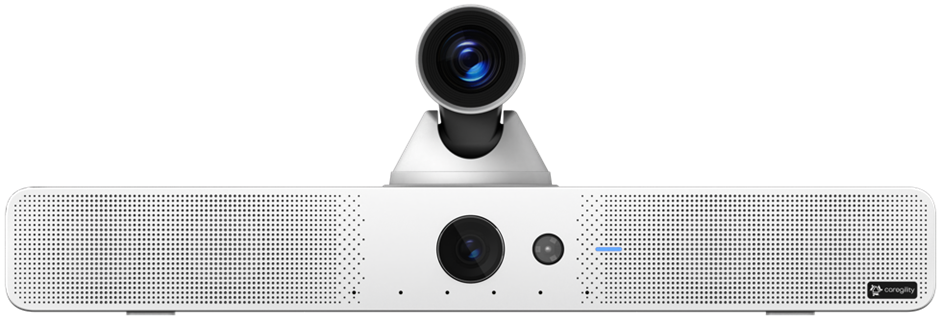
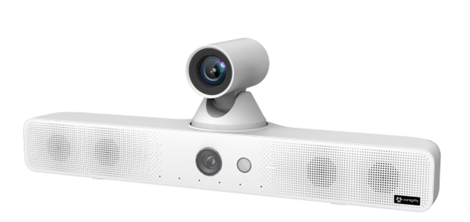
Our next-generation room device, the new APS200 Duo, is designed and engineered for diverse care needs. The first-of-its-kind dual camera device is a powerful addition with advanced capabilities such as a built-in beamforming microphone array, wide-angle lens, and zoom lens for a flexible and feature-rich experience.
The groundbreaking features in the APS200 Duo support simultaneous, independent camera streams with individual pan, tilt, and zoom controls, allowing remote clinicians and AI systems to access video and audio streams independently while maintaining full control over camera settings.
APS100 Pro with FlexCam for Versatile Care
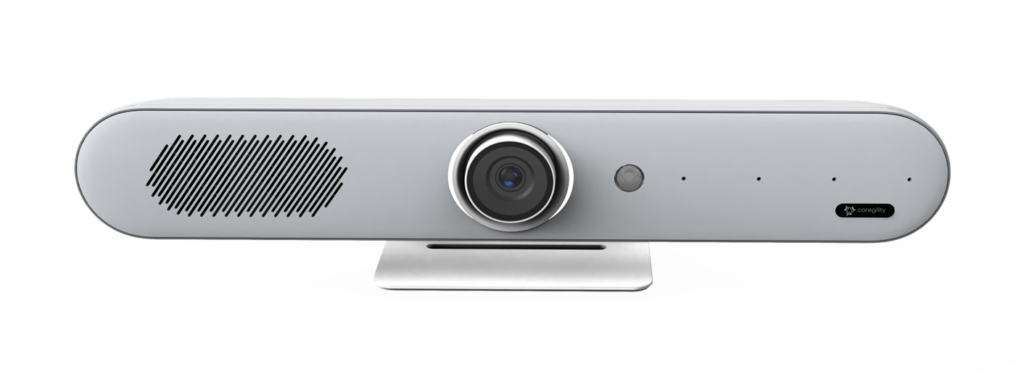
We introduced the flexibility to add a FlexCam camera to our APS100 Pro devices, which allows external camera integration for versatile positioning. With two cameras at their fingertips, care providers can either scan an entire patient room for comprehensive views or zoom into a specific area for detailed observation as necessary.
AI Equipped Devices
Our new APS devices come equipped with advanced intelligence built-in, transforming video and audio capabilities. With smart infrared processing for night vision, far-end camera control, and multi-streaming video capabilities, the devices provide clear visuals in all conditions. On the audio front, we provide multi-streaming audio, noise suppression, adaptive gain control, far-end audio control, and a beamforming microphone array for precise sound capture. This is all possible as we power our new generation devices for edge computing with an 8-core CPU, dedicated GPU and NPU, up to 32GB of RAM, and hardware encoding and decoding up to 8K at 30 fps.
Together, the APS200 Duo and APS100 Pro with FlexCam are redefining hybrid AI workflows, making it easier and more accessible than ever for clinicians to provide exceptional care tailored to unique workflow requirements. This future-proofs your investment, ensuring our devices can handle the ever-changing demands of AI workloads while delivering exceptional performance in diverse care settings.
New Device Integrations
Integrate with TVs in the Patient Room
Caregility device integration with existing TV hardware in hospital rooms through RS-232 cables preserves hospital infrastructure investments and optimizes resource allocation. This integration enhances patient experience by improving communication via large TV screens, making care team engagement more effective and inclusive. Furthermore, the seamless, robust video call integrations with partners such as Aceso, Avidex, eVideon, Get Well, Oneview, and pCare provide a cohesive experience for both clinicians and patients via the TV.
Connected Ecosystem Enhancements with OneView and Social Mobile
Enhancing bedside experience plays a crucial role in patient care, as it influences comfort, improves communication, and shapes the perception of care quality. In partnership with Oneview, Caregility introduced two-way calling between clinicians and patients via the Social Mobile tablet, improving communication while protecting patient privacy. Much like our television integration, embedded intelligence seamlessly connects patients to clinician calls and effortlessly returns them to their previous activities once consultations are complete.
As we continue to innovate and adapt to the evolving needs of healthcare, we are committed to bringing more groundbreaking capabilities that make your clinical workflows smoother and interactions with patients more meaningful through the latest in healthcare technology. The improvements we’ve introduced this July are just the beginning of the journey. Stay tuned for more updates!
Cookie Consent
We use cookies to improve your experience on our site. By using our site, you consent to cookies.
Cookie Preferences
Manage your cookie preferences below:
Essential cookies enable basic functions and are necessary for the proper function of the website.
Name
Description
Duration
Geolocation Config
This cookie is used to store the consent settings based on the visitor's location.
60 days
Cookie Preferences
This cookie is used to store the user's cookie consent preferences.
60 days
CloudFlare provides web performance and security solutions, enhancing site speed and protecting against threats.
These cookies are for internal use which allows Cloudflare to identify production issues on clients.
session
cf_chl_rc_m
These cookies are for internal use which allows Cloudflare to identify production issues on clients.
session
__cfruid
Used by the content network, Cloudflare, to identify trusted web traffic.
session
__cf_bm
Cloudflare's bot products identify and mitigate automated traffic to protect your site from bad bots. Cloudflare places the __cf_bm cookie on End User devices that access Customer sites that are protected by Bot Management or Bot Fight Mode. The __cf_bm cookie is necessary for the proper functioning of these bot solutions.
session
__cflb
When enabling session affinity with Cloudflare Load Balancer, Cloudflare sets a __cflb cookie with a unique value on the first response to the requesting client. Cloudflare routes future requests to the same origin, optimizing network resource usage. In the event of a failover, Cloudflare sets a new __cflb cookie to direct future requests to the failover pool.
session
_cfuvid
The _cfuvid cookie is only set when a site uses this option in a Rate Limiting Rule, and is only used to allow the Cloudflare WAF to distinguish individual users who share the same IP address.
session
cf_clearance
Whether a CAPTCHA or Javascript challenge has been solved.
session
__cfseq
Sequence rules uses cookies to track the order of requests a user has made and the time between requests and makes them available via Cloudflare Rules. This allows you to write rules that match valid or invalid sequences. The specific cookies used to validate sequences are called sequence cookies.
session
cf_ob_info
The cf_ob_info cookie provides information on: The HTTP Status Code returned by the origin web server. The Ray ID of the original failed request. The data center serving the traffic
session
cf_use_ob
The cf_use_ob cookie informs Cloudflare to fetch the requested resource from the Always Online cache on the designated port. Applicable values are: 0, 80, and 443. The cf_ob_info and cf_use_ob cookies are persistent cookies that expire after 30 seconds.
session
__cfwaitingroom
The __cfwaitingroom cookie is only used to track visitors that access a waiting room enabled host and path combination for a zone. Visitors using a browser that does not accept cookies cannot visit the host and path combination while the waiting room is active.
session
cf_chl_rc_i
These cookies are for internal use which allows Cloudflare to identify production issues on clients.
session
Statistics cookies collect information anonymously. This information helps us understand how visitors use our website.
Google Analytics is a powerful tool that tracks and analyzes website traffic for informed marketing decisions.
Contains information related to marketing campaigns of the user. These are shared with Google AdWords / Google Ads when the Google Ads and Google Analytics accounts are linked together.
90 days
__utma
ID used to identify users and sessions
2 years after last activity
__utmt
Used to monitor number of Google Analytics server requests
10 minutes
__utmb
Used to distinguish new sessions and visits. This cookie is set when the GA.js javascript library is loaded and there is no existing __utmb cookie. The cookie is updated every time data is sent to the Google Analytics server.
30 minutes after last activity
__utmc
Used only with old Urchin versions of Google Analytics and not with GA.js. Was used to distinguish between new sessions and visits at the end of a session.
End of session (browser)
__utmz
Contains information about the traffic source or campaign that directed user to the website. The cookie is set when the GA.js javascript is loaded and updated when data is sent to the Google Anaytics server
6 months after last activity
__utmv
Contains custom information set by the web developer via the _setCustomVar method in Google Analytics. This cookie is updated every time new data is sent to the Google Analytics server.
2 years after last activity
__utmx
Used to determine whether a user is included in an A / B or Multivariate test.
18 months
_ga
ID used to identify users
2 years
_gali
Used by Google Analytics to determine which links on a page are being clicked
30 seconds
_ga_
ID used to identify users
2 years
_gid
ID used to identify users for 24 hours after last activity
24 hours
_gat
Used to monitor number of Google Analytics server requests when using Google Tag Manager
1 minute
Google Tag Manager simplifies the management of marketing tags on your website without code changes.
Name
Description
Duration
td
Registers statistical data on users' behaviour on the website. Used for internal analytics by the website operator.
session
cookiePreferences
Registers cookie preferences of a user
2 years
Hotjar is a powerful analytics tool that helps you understand user behavior through heatmaps and session recordings.
Name
Description
Duration
_hjCachedUserAttributes
This cookie stores User Attributes which are sent through the Hotjar Identify API, whenever the user is not in the sample. These attributes will only be saved if the user interacts with a Hotjar Feedback tool.
session
_hjIncludedInSessionSample
This cookie is set to let Hotjar know whether that visitor is included in the data sampling defined by your site's daily session limit
30 minutes
_hjSession_
A cookie that holds the current session data. This ensues that subsequent requests within the session window will be attributed to the same Hotjar session.
30 minutes
_hjSessionUser_
Hotjar cookie that is set when a user first lands on a page with the Hotjar script. It is used to persist the Hotjar User ID, unique to that site on the browser. This ensures that behavior in subsequent visits to the same site will be attributed to the same user ID.
365 days
_hjSessionTooLarge
Causes Hotjar to stop collecting data if a session becomes too large. This is determined automatically by a signal from the WebSocket server if the session size exceeds the limit.
session
_hjSessionRejected
If present, this cookie will be set to 1 for the duration of a user’s session, if Hotjar rejected the session from connecting to our WebSocket due to server overload. This cookie is only applied in extremely rare situations to prevent severe performance issues.
session
_hjSessionResumed
A cookie that is set when a session/recording is reconnected to Hotjar servers after a break in connection.
session
hjViewportId
This cookie stores user viewport details such as size and dimensions.
Session
_hjSessionStorageTest
This cookie checks if the Hotjar Tracking Code can use Session Storage. If it can, a value of 1 is set.
Session
_hjTLDTest
When the Hotjar script executes we try to determine the most generic cookie path we should use, instead of the page hostname. This is done so that cookies can be shared across subdomains (where applicable). To determine this, we try to store the _hjTLDTest cookie for different URL substring alternatives until it fails. After this check, the cookie is removed.
session
_hjCookieTest
This cookie checks to see if the Hotjar Tracking Code can use cookies. If it can, a value of 1 is set.
Session
_hjUserAttributesHash
User Attributes sent through the Hotjar Identify API are cached for the duration of the session in order to know when an attribute has changed and needs to be updated.
session
_hjIncludedInPageviewSample
This cookie is set to let Hotjar know whether that visitor is included in the data sampling defined by your site's page view limit.
30 minutes
_hjLocalStorageTest
This cookie is used to check if the Hotjar Tracking Script can use local storage. If it can, a value of 1 is set in this cookie. The data stored in_hjLocalStorageTest has no expiration time, but it is deleted immediately after creating it so the expected storage time is under 100ms.
-
_hjHasCachedUserAttributes
This cookie sets when a user first lands on a page. Persists the Hotjar User ID which is unique to that site. Hotjar does not track users across different sites. Ensures data from subsequent visits to the same site are attributed to the same user ID.
365 days
_hjid
Hotjar cookie. This cookie is set when the customer first lands on a page with the Hotjar script. It is used to persist the random user ID, unique to that site on the browser. This ensures that behavior in subsequent visits to the same site will be attributed to the same user ID.
365 days
hj_visitor
hotjar uses cookies to enhance the user’s experience on our website, for example to complete forms, navigating the site, and identify returning users and offer related content. Users can control the use of cookies at the individual browser level.
Session
_hjIncludedInSample
Hotjar cookie. This session cookie is set to let Hotjar know whether that visitor is included in the sample which is used to generate funnels.
365 days
_hjClosedSurveyInvites
Hotjar cookie. This cookie is set once a visitor interacts with a Survey invitation modal popup. It is used to ensure that the same invite does not re-appear if it has already been shown.
365 days
_hjDonePolls
Hotjar cookie. This cookie is set once a visitor completes a poll using the Feedback Poll widget. It is used to ensure that the same poll does not re-appear if it has already been filled in.
365 days
_hjMinimizedPolls
Hotjar cookie. This cookie is set once a visitor minimizes a Feedback Poll widget. It is used to ensure that the widget stays minimizes when the visitor navigates through your site.
365 days
_hjDoneTestersWidgets
Hotjar cookie. This cookie is set once a visitor submits their information in the Recruit User Testers widget. It is used to ensure that the same form does not re-appear if it has already been filled in.
365 days
_hjMinimizedTestersWidgets
Hotjar cookie. This cookie is set once a visitor minimizes a Recruit User Testers widget. It is used to ensure that the widget stays minimizes when the visitor navigates through your site.
365 days
_hjShownFeedbackMessage
This cookie is set when a visitor minimizes or completes Incoming Feedback. This is done so that the Incoming Feedback will load as minimized immediately if they navigate to another page where it is set to show.
365 days
_hjFirstSeen
The cookie is set so Hotjar can track the beginning of the user's journey for a total session count. It does not contain any identifiable information.
30 minutes
_hjAbsoluteSessionInProgress
The cookie is set so Hotjar can track the beginning of the user's journey for a total session count. It does not contain any identifiable information.
30 minutes
_hjptid
This cookie is set for logged in users of Hotjar, who have Admin Team Member permissions. It is used during pricing experiments to show the Admin consistent pricing across the site.
session
Vimeo is a video hosting platform for high-quality content, ideal for creators and businesses to showcase their work.
Collects analytical tracking information about videos and enables the player to function properly.
2 years
sd_identity
Collects analytical tracking information about videos and enables the player to function properly.
2 years
continuous_play_v3
Used to keep track of whether continuous play is on or not for a user
2 years
Player
This first party cookie created by Vimeo is used to remember user’s player mode preferences.
1 minute
vuid
This first party cookie created by Vimeo is used to assign a Vimeo Analytics unique id.
1 minute
Marketing cookies are used to follow visitors to websites. The intention is to show ads that are relevant and engaging to the individual user.
Name
Description
Duration
hubspotutk
Hubspot
1 day
__hstc
Hubspot
6 months
__hstc
Hubspot
1 day
__hssrc
Hubspot
1 day
__hssc
Hubspot
1 day
HubSpot is an all-in-one marketing, sales, and customer service platform that streamlines business growth.
Name
Description
Duration
hs-messages-hide-welcome-message
This cookie is used to prevent the chat widget welcome message from appearing again for one day after it is dismissed.
1 day
hubspotapi-prefs
This is used with the hubspotapi cookie to remember whether the user checked the 'remember me' box (controls the expiration of the main cookie's authentication).
1 Year
hubspotapi
This cookie allows the user to access the app with the correct permissions.
7 days
__hs_opt_out
This cookie is used by the opt-in privacy policy to remember not to ask the visitor to accept cookies again.
13 months
hubspotapi-csrf
This is used for CSRF prevention - preventing third party websites from accessing your data. Expires after a year.
1 year
__hs_do_not_track
This cookie can be set to prevent the tracking code from sending any information to HubSpot.
13 months
__hs_cookie_cat_pref
This cookie is used to record the categories a visitor consented to.
6 months
__hs_initial_opt_in
This cookie is used to prevent the banner from always displaying when visitors are browsing in strict mode.
7 days
__hs_gpc_banner_dismiss
This cookie is used when the Global Privacy Control banner is dismissed.
180 days
hs_ab_test
This cookie is used to consistently serve visitors the same version of an A/B test page they’ve seen before.
session
__hs_notify_banner_dismiss
This cookie is used when the website uses a Notify consent banner type.
180 days
hs-messages-is-open
This cookie is used to determine and save whether the chat widget is open for future visits.
30 minutes
__hsmem
This cookie is set when visitors log in to a HubSpot-hosted site.
1 year
hs-membership-csrf
This cookie is used to ensure that content membership logins cannot be forged.
session
hs_langswitcher_choice
This cookie is used to save the visitor's selected language choice when viewing pages in multiple languages.
2 years
__hstc
The main cookie for tracking visitors.
13 months
hubspotutk
This cookie keeps track of a visitor's identity. It is passed to HubSpot on form submission and used when deduplicating contacts.
13 months
__hssc
This cookie keeps track of sessions.
30 minutes
__hssrc
Whenever HubSpot changes the session cookie, this cookie is also set to determine if the visitor has restarted their browser.
session
messagesUtk
This cookie is used to recognize visitors who chat with you via the chatflows tool. If the visitor leaves your site before they're added as a contact, they will have this cookie associated with their browser.
13 months
LinkedIn Insight is a web analytics service that tracks and reports website traffic.